Demo & Get Quote

Corporate Travel
Management System

Take your corporate clients digital. Company travel policy, approval workflows and cost analysis in one platform.

Demo & Get Quote

Main platform: Corporate Travel Management

Corporate Travel Management

How the corporate portal works

The company manager sets the policy, approval flow and budgets; staff search and request within those rules.

Travel policy

A policy applies to the company, a branch, a department, a title grade or a person; each rule blocks, sends for approval or only informs.

Approval flow

Requests pass sequential or parallel levels by amount band, with a time limit, reminder and escalation per level; nobody approves their own request.

Budgets

Period budgets per branch or department show actual, committed and remaining amounts; on overrun: warn, ask a reason, send for approval or stop.

Trip file and reports

Items, service fee and documents sit in the trip file; spend, policy compliance and approval times are reported and exported to Excel, CSV or PDF.

Watch the company manager's portal

Policy rules, policy marks in hotel search, approval time limits and price tolerance, the budget overrun rule, after-sales authority and the trip file.

Corporate travel platform: policy, approval, budget, trip file

Company travel on your rules: policy, approval, budget and trip file

Policy rules

Corporate portal

Policy rules

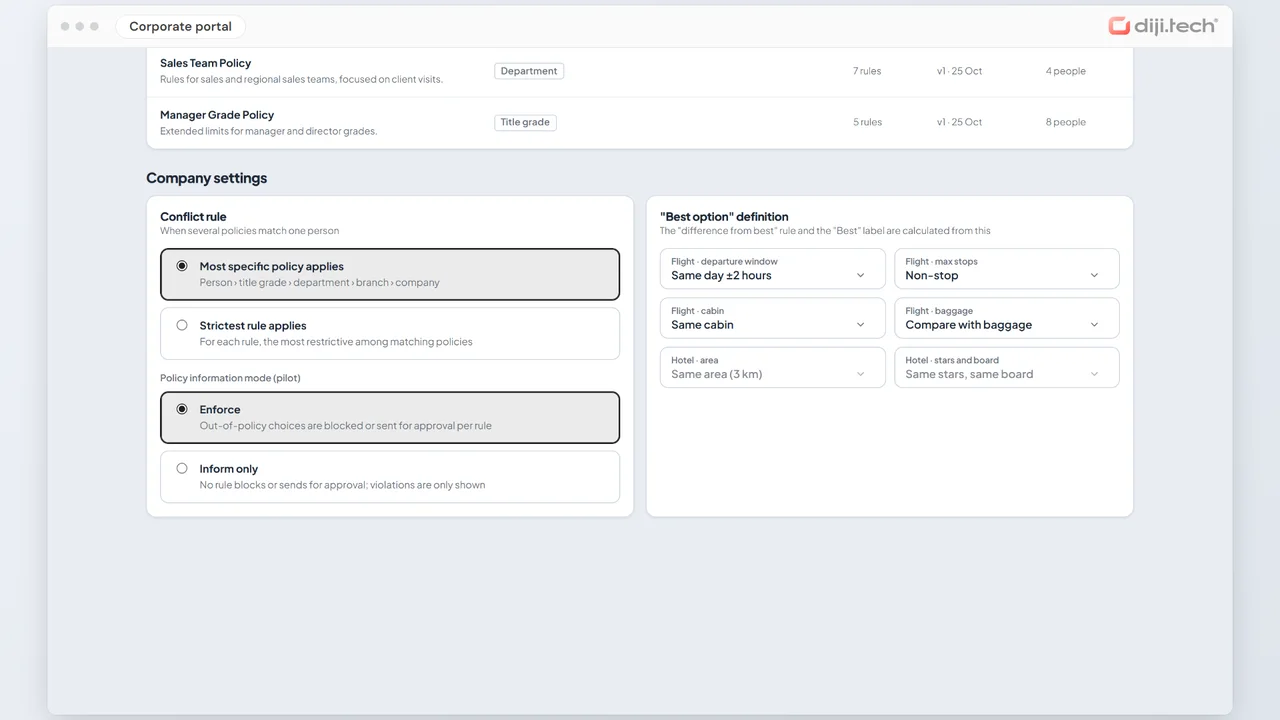
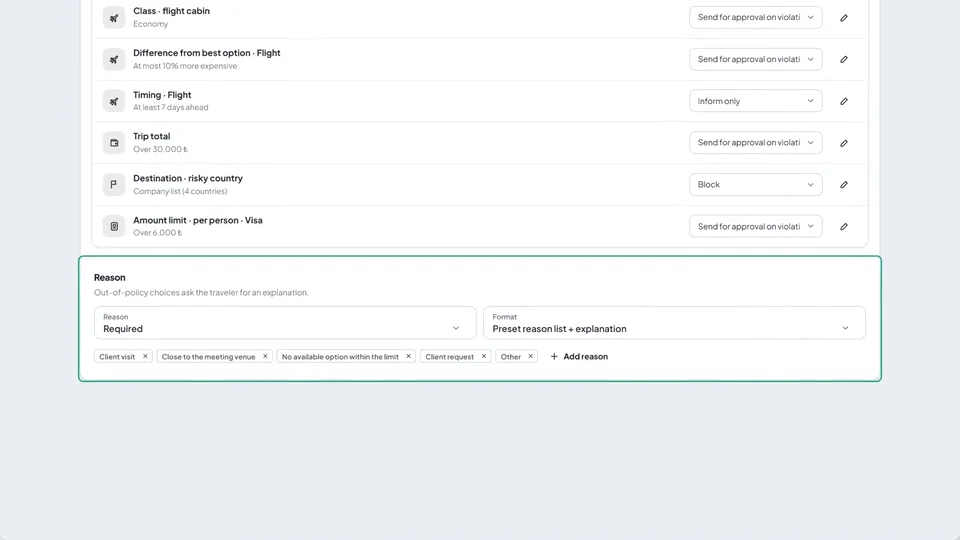
Apply a policy to the company, a branch, a department, a title grade or a person. For each rule you choose the outcome: block, send for approval on violation, always send for approval, or inform only. An out-of-policy choice asks the traveller for a reason from a preset list; when several policies match, the most specific policy or the strictest rule applies. The version history shows how many requests each version judged.
Policy marks in search

Corporate portal

Policy marks in search

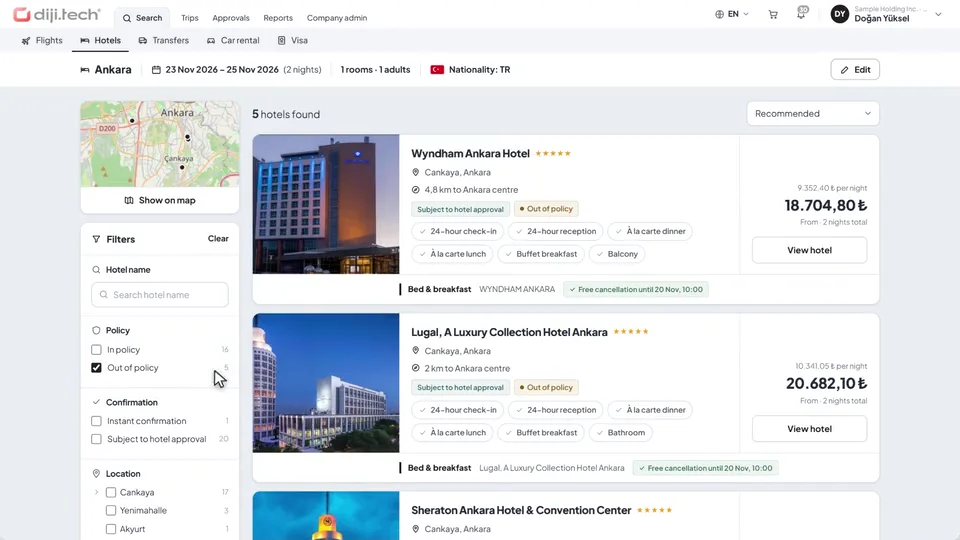
Hotel results show in policy or out of policy next to each hotel, and the reason when it is out: for example the nightly limit exceeded, with the amount and the limit. The Policy filter narrows the list in one click. Room rates carry their policy status too; for hotels whose price cannot be held, the price is re-checked at approval.

Approval time limits and price tolerance

Corporate portal

Approval time limits and price tolerance

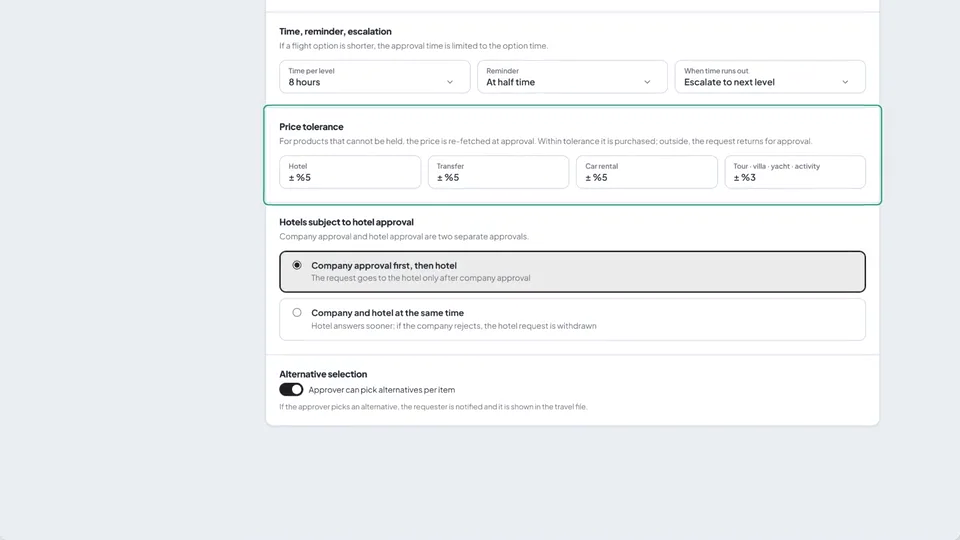
The approval flow sets a time limit and a reminder per level; when time runs out the request is escalated to the next level. For products whose price cannot be held, such as hotels, transfers and car rental, the price is re-checked at approval: within the tolerance it is purchased, outside it the request goes back for approval.

Budgets and the overrun rule

Corporate portal

Budgets and the overrun rule

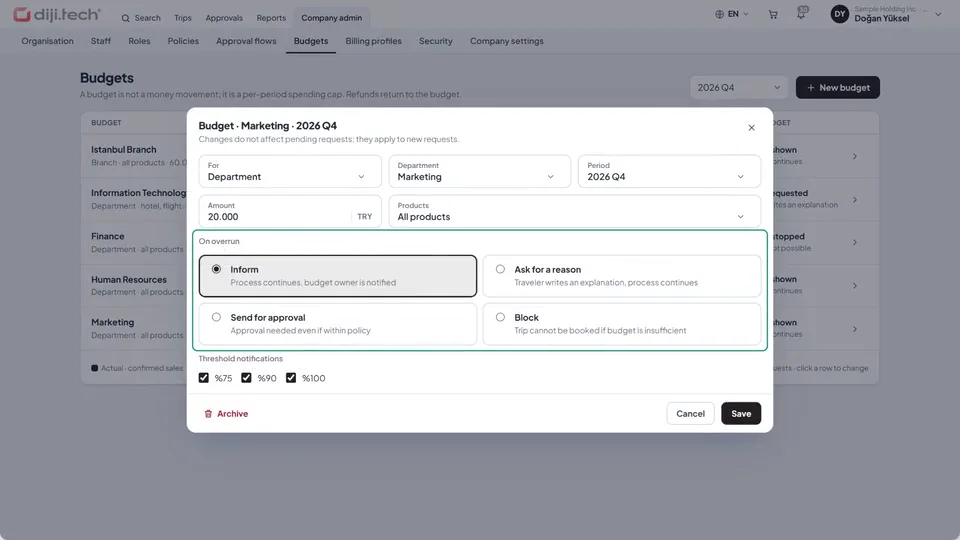
Set period budgets for a branch or a department, for all products or the ones you choose. The list shows actual, committed (pending approval and on option) and remaining amounts side by side. You choose what happens on overrun: inform, ask for a reason, send for approval, or block; notifications go out at the 75%, 90% and 100% thresholds.

Trip file and reports

Corporate portal

Trip file and reports

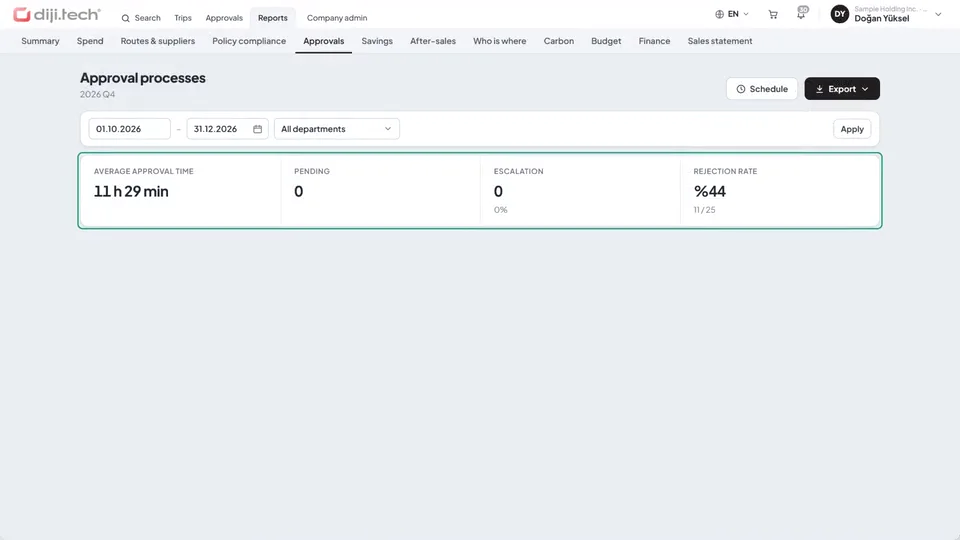
The trip file keeps the items, the net price and the agency's separately invoiced service fee, the billing profile, the itinerary and the voucher together; change requests start here. The approval report gives the average approval time, escalations and the rejection rate; the sales statement gives fare, service fee and VAT totals.

API Integrations

Works integrated with leading travel API providers worldwide.

Corporate Travel Modules

Integrated modules that digitalize your business travel end-to-end

Company Tree and Roles

Holding, companies, branches and departments in one tree; staff join by invitation or from Excel. Ready and custom roles, each with its own data scope.

Travel Policy Engine

Policies by person, unit or title grade; rules for hotel limits, cabin, gap to the best option, days ahead, trip total and risky countries. Each rule blocks, sends for approval or informs.

Approval Flow

Sequential or parallel levels by amount band, with time limits, reminders and escalation. Approvers see the violation, the reason and the budget impact, and can pick the in-policy alternative.

Budgets

Period budgets per branch or department, with actual, committed and remaining amounts. On overrun: warn, ask a reason, send for approval or stop.

Reporting & Analytics

Spend by unit, department and person; policy compliance, approval times, missed savings and the sales statement. Excel, CSV or PDF, or a weekly or monthly scheduled e-mail.

Trip File and Traveller Profile

The trip file keeps items, net price and service fee apart, with the billing profile and documents. The traveller profile holds documents, loyalty cards and seat, meal and room preferences.

Discover the Corporate Travel Portal

Get to know the corporate travel portal with a free demo. Offer your corporate clients a travel portal that runs on policy, approval and budget rules.