
The story of an agency site translated into seven languages is almost always the same. The English side does business, the German side barely, and the remaining five languages produce close to nothing. The team blames the content first: the translations get redone, a few more articles go up, a copywriter is briefed. The numbers do not move. Because the problem is usually not in the text you wrote. It is in how many separate addresses that text is served from, with which status code, and under which language annotation.
This article turns the findings of an end-to-end technical audit of a seven-language travel software site into a working guide. Every number below comes either from that audit or from an external study whose source is named; none of them are estimates. The audit covered 1,088 live pages, 1,469 sitemap entries and all seven languages, and the picture it produced was this: 85% of the pages carried no canonical address at all, the entire site was duplicated across two different hosts, and translations declared in six languages were in fact returning a "page not found" message.
Each section below gives you one check, one threshold or one decision rule that you can run on your own site with a browser and curl, without buying any software. The order matters too: content depth does not work before the technical cleanup, and AI visibility does not work before content depth.
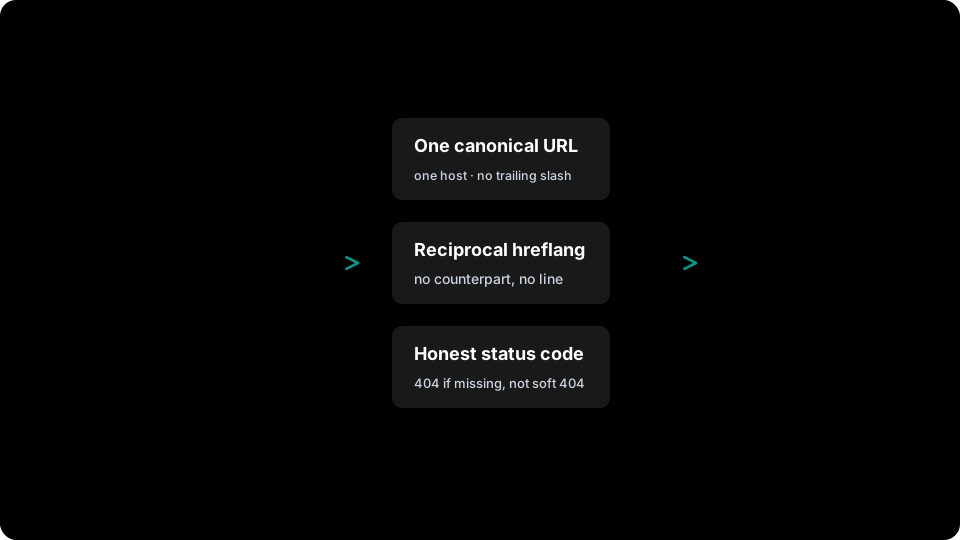
The audit order: first a single source of truth (canonical address, reciprocal hreflang, honest status code), then content, and AI visibility last.
1. Count first: how many addresses lead to the same page?
Do not start the audit with content. Start it by counting addresses. Measuring how many different URLs open the same page takes ten minutes and usually exposes the single largest loss on the first pass.
The site we measured had two structural faults. First, the domain answered 200 both with and without www, which meant the whole site was reachable twice over. Second, the old and the new path names had been left open side by side, so /en/portfolio and /en/references served identical content; that single pattern was generating roughly 1,713 shadow addresses.
Request these five variants on your own site, in order, and write down the status code that comes back:
| Variant | Example | Expected result |
|---|---|---|
| Host without www | example.com/en/blog |
301 → www version |
| Host with www | www.example.com/en/blog |
200 |
| Trailing slash | www.example.com/en/blog/ |
301 → no-slash version |
| Tracking parameter | www.example.com/en/blog?utm=x |
200 + canonical without the parameter |
| Legacy path name | www.example.com/en/articles |
301 → new path |
One line on the command line is enough:
curl -s -o /dev/null -w "%{http_code} %{redirect_url}\n" -I <address>
If two or more of the five return 200, the search engine is not seeing one page of yours. It is seeing several near-identical pages. This is not a penalty issue; it is a signal-splitting issue. Links, click data and crawl budget that should land on one address are shared out across all of them.

If all five variants return 200, the signal is split five ways. The fix has an order: legacy paths merge in via 301, and what remains is consolidated with a self-referencing canonical tag.
Decision rule
Define exactly one canonical form per page and pin three things to it: the host (with or without www — pick one), the trailing-slash policy (always or never) and letter case. Until those three decisions are written down somewhere, every new page template will invent its own variant.
2. Canonical is a signal, not an order
This was the most striking number in the audit: of the 1,088 pages returning 200, 921 (85%) had no canonical tag at all. Of the 167 pages that did carry one, 60 were not self-referencing — the page was served from www.example.com/en while the canonical read https://example.com/en/. Neither the host nor the trailing slash matched.
Two technical facts matter here. Google's own documentation describes rel="canonical" not as a directive but as "a strong signal that the specified URL should be the canonical one"; the final decision belongs to the search engine. The same documentation ranks canonicalisation methods from strongest to weakest: redirect > canonical tag > presence in the sitemap. The sitemap is explicitly called a weak signal.
The practical consequence: a canonical tag is not a cleanup tool on its own. If you want to retire an old address, redirect it. Reserve the canonical tag for variants that cannot be redirected — parameterised versions, filter combinations, session-tracked URLs.
The second fact: Google recommends that the canonical page itself carries a self-referencing canonical. The common assumption that "canonical is only written on duplicate pages" is wrong; the primary page should point at itself as well.
Why hand-written canonicals always drift
On the site we audited, the canonical tag had been hand-written into ten different page templates: one with a trailing slash, one without www, one with a path segment that no longer existed. Fourteen further templates had none at all. This is not carelessness, it is a structural outcome. If every developer writing a new template has to remember the rule from scratch, the rule will eventually be forgotten.
The workable rule: canonical, hreflang and og:url should be produced in one shared place rather than in page templates, and rendered exactly once per page. If a page tries to write its own canonical, the publishing process should stop it. In the structure built after the audit, this rule was wired into a build check — guaranteed by architecture rather than by discipline.
3. hreflang: the price of declaring a language that does not exist
This is the most expensive mistake multilingual sites make. On the site we audited, an English blog post declared an address as its German counterpart. That address returned HTTP 200 — but the body said "Blog Post Not Found". The same pattern repeated across six languages. In other words, the site was voluntarily reporting hundreds of empty pages to the search engine.
Google's documentation on localised versions is unambiguous: "If page X links to page Y, page Y must link back to page X. If this is not the case for all pages that use hreflang, the annotations may be ignored or not interpreted correctly." The same document puts it even more plainly: "If two pages don't point to each other, the tags are ignored."
Three rules follow from that:
| Situation | Correct behaviour | Wrong behaviour |
|---|---|---|
| Translation exists and is published | Declare hreflang in both directions | Declare it one way only |
| No translation | Declare no hreflang at all | Reuse the same slug for that language |
| Translation exists but is a draft | Declare nothing until it is live | Declare it "because it ships soon" |
Left: a one-way declaration pointing at an address that returns 200 but has no content behind it. Right: only languages with a real translation are declared, reciprocally, and the German line is simply not written at all.
Two further mistakes on Google's own list deserve attention: language codes that stray outside ISO 639-1, and unofficial region values such as EU, UK or UN. The region code must be ISO 3166-1 Alpha 2, and a region on its own is not valid — you do not write hreflang="EN", you write hreflang="en" or hreflang="en-GB".
x-default defines a fallback address for users whose language you cannot resolve. On a multilingual agency site the sensible choice is the home page of the language you sell in internationally — usually English — or a language-selection screen if you have one.
4. Soft 404: saying "not found" while returning 200
A soft 404, in Google's definition, is a page whose content is an error message or an empty result while the server returns a 2xx success code. It is the hardest fault to notice, because no monitoring tool raises an alarm: the page "works", and no human visits that address anyway.
On the site we audited, missing content returned 200 plus "not found". When we switched those responses to honest 404s, three faults that had been completely hidden became visible at once:
| Fault that surfaced | Addresses affected |
|---|---|
| Percent-encoded paths were never being decoded | 23 |
| Category pages listed in the sitemap with no real counterpart | 33 |
| Database slugs out of sync with the product definition | 10 |
The most dramatic finding: the Arabic product pages had never worked for a single real client since the day they went live. Requested as raw UTF-8 they returned 200; requested in the percent-encoded form a browser actually sends, they returned 404. Because it was a soft 404, nobody had noticed, and the team believed the Arabic pages were live.
Decision rule
Do not be afraid of switching to honest 404s. Your error count will rise in the short term — that is not a regression, it is your measurement becoming accurate. For addresses that will never come back, 410 is clearer still; but which address is never coming back is a content decision, so make that one first.
5. Non-Latin scripts in URLs: the percent-encoding trap
Paths containing Arabic, Cyrillic or Turkish characters are percent-encoded by the browser before they are sent. Google's URL structure documentation recommends this explicitly: "Non-ASCII characters should be percent-encoded." The same document also supports using words in the target audience's language — and transliteration where that helps — inside the address.
The problem is that if the server side never decodes that encoding, an entire language dies silently. To check it yourself, request the same address in two forms:
- Raw form:
/ar/blog/<arabic-slug> - Percent-encoded form:
/ar/blog/%D8%A8...
If the two do not return the same status code, you have a fault. The number of languages to test is small; the blast radius is an entire market.
A workable policy: for languages written in a non-Latin script, consciously pick one of three options and apply it consistently across all languages — (a) the target language's own script, if you have verified that percent-encoding works end to end; (b) transliteration (budushcheye-... for Russian); or (c) an English slug with a language prefix. None of the three is wrong. What is wrong is behaving differently from one language to the next.
Google also recommends hyphens over underscores as word separators: "We recommend that you use hyphens (-) instead of underscores (_) in your URLs." The reasoning is that underscores are conventionally used in programming to bind concepts together rather than separate them.
6. A sitemap is not a list, it is a commitment
Every address you place in a sitemap is a statement: "this is a real page, worth indexing." The site we audited declared 1,469 addresses; after cleanup it declared 1,386. What came out:
- 28 addresses returned raw data (JSON) rather than HTML — an application interface endpoint had been declared as if it were a page.
- 21 addresses could not be rendered at all.
- 33 addresses were category pages with no real counterpart; their bodies ran to 21-25 words and every one of them printed the same "could not load" template.
On top of that, all 1,469 addresses were published on the wrong host (without www) — the sitemap was declaring a list that contradicted the site's own canonical decision.
The second silent fault sat in the lastmod field: it produced "today" on every request. That renders the field meaningless. lastmod has to be fed from the content's genuine last-modified date; otherwise crawlers stop taking the signal into account at all.
Sitemap checklist
- Is the host in the sitemap byte-for-byte the site's canonical host?
- Pull ten random addresses — do all of them return 200 and
Content-Type: text/html? - Is the trailing-slash policy applied inside the sitemap too?
- Are the
lastmodvalues different from each other, or are they all the same day? - Are languages without a translation kept out of the sitemap entirely?
- Have pages marked
noindexbeen removed from the sitemap?
7. The silent robots.txt mistake: the group rule
This was one of the cheapest and most expensive faults in the audit at once: the file contained a Disallow line, correctly written, that was completely inert for Googlebot because it had been placed in the wrong group.
The reason is the group logic standardised in RFC 9309. The standard says a crawler finds the group matching its own product token and obeys the rules in that group. The wildcard * group only comes into play when no matching group exists. So consider a file like this:
| Group | Rules inside it |
|---|---|
User-agent: Googlebot |
Disallow: /search |
User-agent: * |
Disallow: /search and Disallow: /cart |
In this file Googlebot may crawl /cart, because that line is not in its own group and no merging with the wildcard group takes place. The rule is simple: if you want a rule to apply, repeat it inside every User-agent group.
Rather than checking by eye, paste your file into the robots.txt report in Search Console and test the target path. The first line where the result disagrees with your expectation is probably this grouping mistake.
8. CDN caching: one visitor's language served to everyone
This was the strangest behaviour the audit turned up. The root address produced a 302 redirect that varied by the visitor's browser language. The intermediate layer was storing that response in cache for an hour without a Vary header. The result: for that hour, the language of the first person to hit the site was served to everyone after them. A corporate prospect arriving with a German browser landed on the Turkish site, and nobody could work out why.
That is exactly what the Vary header is for: it tells the cache which request headers the stored response depends on. In MDN's phrasing, including Vary "ensures that responses are cached separately based on the headers listed in the Vary field." Without the header, the cache treats every request to the same address as identical and returns the same response regardless of language, cookie or device.
The response varies by language, but the cache key is the address alone. For an hour, the first visitor's language becomes everyone's language.
Pick one of two fixes:
A — Split the response. Add Vary: Accept-Language to every response that varies by language. The cache then keeps a separate entry per language. The cost: your cache hit rate drops.
B — Fix the response (preferred). Have the root address perform a single permanent redirect that ignores language (/ → 301 → /en, for example), and resolve the language preference inside the page. The cache stays efficient and the search engine sees one consistent behaviour.
Second rule: never measure before you purge the cache
A CDN can hold HTML responses for up to twenty-four hours. If you measure a fix immediately after deploying it, you are measuring the old version and you will conclude that "it did not work". The correct post-deploy order is: deploy → purge the cache for the affected paths → measure. We have watched a perfectly good fix get rolled back more than once because this step was skipped.
9. Redirect chains and non-canonical targets
Before the audit, the root address behaved like this: / → 302 → /en/ → 308 → /en. Three stops. Every stop is extra latency for the browser and signal loss for the search engine; on top of that, the first hop being a 302 (temporary) says the destination is not the permanent canonical. It was reduced to a single step: / → 301 → /en.
The second finding was more insidious. The site had a redirect table moving old addresses to new ones, and 329 of the targets in that table were themselves non-canonical — meaning that once the rules fired, each one would generate a second redirect. It was caught before canonicalisation went live; had it not been, 329 new chains would have been born on release day.
Decision rule
Before you add a row to your redirect table, validate the target against the canonical form: right host, right trailing-slash policy, and a page that genuinely returns 200. That validation should be a mandatory step in any work that touches the table; cleaning it up afterwards, row by row, costs many times more.
10. Pages that get lost inside your own site
A page being in the sitemap does not make it findable. The audit produced two separate loss items.
49 indexable orphan addresses. Pages declared in the sitemap that receive not a single link anywhere on the site: one help centre page (7 languages), five integration category pages (35 addresses) and 7 addresses where the listing and the code had drifted apart. For some of them a URL-generating function had been written and even wired into the menu component — and then never called.
70 broken internal links. Four category cards on the help page pointed at a path that did not exist (4 cards × 7 languages = 28 links). The breadcrumb on service detail pages referenced a service index page that had never been built (2 locations × 3 services × 7 languages = 42 links) — and the same broken address was being written into structured data as well.
The third finding is subtler: 21 of 33 blog posts sat at click depth 3, and their only route in was a pagination step marked noindex. Because the links were followable they were technically being crawled, but there was no real, indexable internal link leading to the posts.
How to measure it
Put your sitemap's address list on one side and your site's internal link graph (every <a href> on every page) on the other, and take the difference. What is in the sitemap but not in the graph is an orphan; what is in the graph but does not return 200 is a broken link. Producing those two sets once a month makes visible a loss most sites never notice.
11. Thin content and pages that are only assumed to be translated
Measured after the audit, the site averaged 472 words, with 176 pages under 300. But the real finding was not the raw number — it was how to read it.
First correction: strip the page furniture. Counting page text as it stands includes the header, the navigation and the footer in your content total. On the site we measured, that fixed furniture accounted for 117-233 words per language. A raw 300 words therefore corresponded to a body of roughly 120 words. Set your real threshold on the furniture-stripped body, not on the raw count.
Second correction: normalise for language morphology. On raw counts, the German translations looked incomplete (median 393 against Spanish 610). The content was in fact identical; the whole difference came from word formation. Flugbuchungssoftware is one word in German; the same phrase runs to five words in Spanish. Measured across eight fully translated pages, the coefficients came out as follows:
| Language | Coefficient (en = 1.00) |
|---|---|
| German | 0.827 |
| Azerbaijani | 0.916 |
| Turkish | 0.929 |
| Russian | 0.939 |
| Arabic | 0.963 |
| Spanish | 1.165 |
Once that correction was applied, it turned out there was no translation gap in German or Spanish, and that the real gap was concentrated in Arabic (22 addresses) and English (16 addresses).
Third finding: a summary is not a translation. Many of the Arabic versions were not full translations but shortened renderings of the English text — 38-48% of the cluster median. They counted as "translated" on paper and competed for nothing in practice.
Fourth finding: 7 groups covering 67 addresses shared byte-identical bodies. Most of them were language versions that had been switched on without the translation ever being done.
Decision rule
If you "open" a language without translating it, that language produces duplicate content and does nothing for the languages you already have. The publishing threshold for a new language should be this: the body in that language reaches at least 85% of the source language's normalised word count. Below that, do not publish; and for a language you have not published, do not write hreflang either (see section 3).
12. AI search: the job that comes after the cleanup
Do not move on to this section before you have closed the eleven items above. AI search is not a separate channel — it is a layer built on top of the same index. If the lower layer is broken, the upper layer is broken with it.
Here is what the numbers say. BrightEdge, tracking from February 2025 to February 2026, finds AI summaries appearing on roughly 48% of monitored queries (up from around 30% a year earlier); on roughly half of all queries, no summary appears at all. In Seer Interactive's February 2026 measurement, organic click-through on queries with a summary was 2.4%, against 3.8% on queries without one. In Pew Research's 900-person US panel (March 2025, 68,879 searches), 8% of visits where an AI summary was shown produced a click on a conventional result link; where no summary was shown, that figure was 15%. Clicks on a link inside the summary ran at just 1%.
The number that matters most for travel: according to BrightEdge, only 17.7% of AI summary citations on travel queries come from the organic top 10 (a year earlier it was 5.7%). More than three quarters of citations, in other words, are pulled from sources that are not on page one.
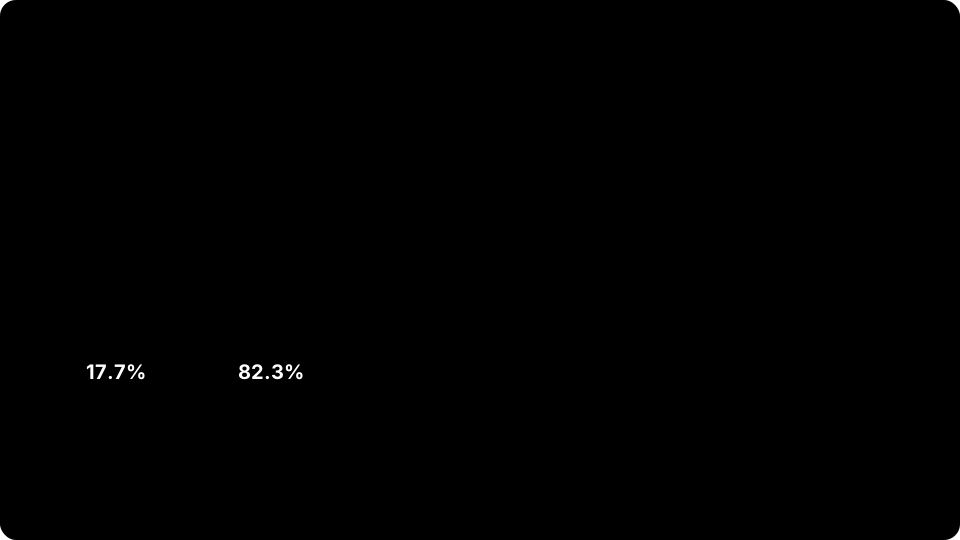
Top: organic click-through compared. Bottom: where citations come from on travel queries. Sources: Seer Interactive and BrightEdge, February 2026.
Read together, those two numbers lead to one practical conclusion: ranking first does not guarantee being cited, and being cited is a separate job. And being cited has a measurable payoff — according to Seer Interactive's April 2026 measurement, brands cited on a query receive 120% more organic clicks per impression than brands that are not.
What to do — and what not to
Start with what not to do, because there is a great deal of noise in this area.
llms.txt is not a solution. In Ahrefs' study of 137,000 domains, 97% of llms.txt files received no request at all during May 2026; of the roughly 38,000 domains with a valid file, only around 1,100 received even one request, 96% of those requests came from bots, and most of those bots were audit and profiling tools rather than AI agents. Google's position is equally clear: the official AI features documentation says "You don't need to create new machine-readable files, AI text files, or markup to appear in these features" and adds: "There's also no special schema.org structured data you need to add."
Producing the file does no harm, but your visibility strategy cannot be built on it. Four things genuinely work:
- An answer paragraph on every page that a machine can lift cleanly. Directly under the heading, 40-60 words, definitional and meaningful on its own. "In this article we will look at…" cannot be quoted; "A void means a ticket is treated as never having been issued after ticketing, and it is only possible inside the window the supplier defines" can be.
- Verifiable numbers with a source. A figure carrying an institution name and a year is worth more to both humans and machines than an unsourced claim. If you cannot cite a number, do not write it; describe the effect qualitatively instead.
- Standard structured data, correctly implemented. Do not go looking for a special schema; fill out standard types such as
Organization,BreadcrumbListandFAQPagecorrectly and consistently. Two typical faults we found in the audit: an organisation logo pointing at a file that did not exist (when the search engine cannot fetch the logo it drops the publisher image entirely), and breadcrumb data reporting the wrong category. - Unique content that is genuinely translated. None of the 67 addresses sharing an identical body across seven languages was citable.
Snippet controls apply here too: Google states that nosnippet, data-nosnippet and noindex also work for AI features. If you do not want a section used in summaries, you already have the tools.
13. A twenty-point technical visibility checklist
It needs no tooling beyond a browser and curl. The expected result is written out for every item.
| # | Check | Expected result |
|---|---|---|
| 1 | Request the host without www | 301 → www version (or the reverse, consistently) |
| 2 | Request the trailing-slash version | 301 → the single form |
| 3 | Request the root address | One-step 301, independent of language |
| 4 | Count canonicals on ten random pages | Exactly one per page |
| 5 | Is the canonical value the page's own address | Yes, host and trailing slash included |
| 6 | hreflang set on a product or blog page | Only languages with a real translation |
| 7 | Request each hreflang target individually | All 200, all with real content |
| 8 | Does every target point back | Yes, reciprocally |
| 9 | Are the language codes ISO 639-1 | Yes; no region code written on its own |
| 10 | Invent a non-existent address and request it | 404 (not 200 plus "not found") |
| 11 | Request a non-Latin slug raw and encoded | Both forms return the same code |
| 12 | Is the sitemap host the canonical host | Yes |
| 13 | Sample ten addresses from the sitemap | All 200 and HTML |
| 14 | Inspect the lastmod values |
Distinct from each other, genuine dates |
| 15 | Read the robots.txt groups | Each rule repeated in every group |
| 16 | Vary on a language-dependent response |
Present; or the response is language-independent |
| 17 | Sample the redirect targets | All canonical and returning 200 |
| 18 | Sitemap minus internal link graph | Empty set (no orphans) |
| 19 | Crawl menu and breadcrumb links | None returning 404 |
| 20 | Post-deploy measurement order | Deploy → purge cache → measure |
14. An audit calendar
Set this up as a one-off project and it will come back within six months. On the site we measured, decay was not simply a matter of neglect; the system drifted on its own because every new page template produced its own variant.
| Frequency | Work | Why |
|---|---|---|
| Every release | Items 1-5, 10, 20 | A new template does not know the old rule |
| Weekly | Items 7, 8, 19 | Translations and content additions break the set |
| Monthly | Items 12-14, 18 | The sitemap and reality drift apart slowly |
| Quarterly | Items 6, 9, 11, 15-17 | Infrastructure and the redirect table change |
Sources
- Google Search Central — Localized versions of your pages (hreflang)
- Google Search Central — Consolidate duplicate URLs (canonical)
- Google Search Central — HTTP status codes and soft 404 errors
- Google Search Central — URL structure best practices
- Google Search Central — AI features and your website
- IETF — RFC 9309: Robots Exclusion Protocol
- MDN Web Docs — Vary header
- BrightEdge — AI Overviews at the One-Year Mark: Presence, Size, and What They're Citing (February 2026)
- Seer Interactive data, reported by ALM Corp — Google AI Overviews and Organic CTR in 2026
- Seer Interactive data, reported by Omnibound — Google AI Overviews Statistics (April 2026)
- Pew Research Center — Google users are less likely to click on links when an AI summary appears
- Ahrefs — We Analyzed 137K Sites: 97% of llms.txt Files Never Get Read (June 2026)
Every measurement without a named source (1,088 pages, 921 missing canonicals, 1,469 → 1,386 sitemap entries, 49 orphans, 70 broken links, 329 non-canonical redirect targets, the language coefficients) comes from our own audit of a seven-language travel software site, carried out in July 2026.
Frequently asked questions
What does the canonical tag actually do?
When several addresses hold the same or very similar content, it tells the search engine which one should be treated as the original. It is not an order, though — in Google's own words it is a strong signal, and the final decision belongs to the search engine. For addresses you want to retire permanently, use a 301 redirect instead of a canonical: a redirect is the stronger signal.
Why is it a problem if both the www and non-www address work?
Because technically these are two different sites. If both return 200, every page of yours becomes reachable twice, and inbound links, click data and crawl budget are split in half. Pick one, redirect the other to it with a 301, and make sure your sitemap and internal links use the version you picked.
Can I write hreflang for every language using the same slug?
Only if that slug genuinely works in that language. Google ties hreflang to a reciprocity requirement: if two pages do not point at each other, the tags can be ignored. Writing hreflang for a language with no translation means declaring a page to the search engine that does not exist. Missing hreflang is better than wrong hreflang.
What is a soft 404 and how do I spot one?
It is a server returning a 200 success code while the content is an error message. The quickest way to find one is to invent an address that does not exist on your site and request it: if the code you get back is not 404, you have soft 404s. Search Console's indexing report also lists these pages in a category of their own.
Why do addresses with Arabic or Cyrillic characters sometimes return 404?
The browser percent-encodes those characters before sending them; if the server does not decode them, the address cannot be found. Because the raw form works when tested by hand, the fault can stay hidden for a long time. The check is to request the same address in both raw and percent-encoded form and confirm that the two responses carry the same status code.
Why has my organic traffic dropped since AI summaries launched?
The measurements show a structural difference: in Seer Interactive's February 2026 data, organic click-through was 2.4% on queries with a summary and 3.8% on queries without. In Pew Research's panel, searches with a summary produced a click on a result link 8% of the time, against 15% without. So even if your ranking holds, you get fewer clicks on queries where a summary appears; the objective has to be getting cited inside that summary.
Should I create an llms.txt file?
It does no harm, but do not build your visibility plan on it. In Ahrefs' study of 137,000 domains, 97% of these files received no request at all during May 2026. Google also states explicitly in its official documentation that no new machine-readable file, markup or special structured data is required to appear in AI features.
How often should I repeat the audit?
Frame it as a one-off project and it will decay within a few months, because every new page template tends to invent its own address variant. A practical rhythm: address and canonical checks on every release, hreflang and internal link checks weekly, sitemap and orphan analysis monthly, and infrastructure checks once a quarter.
Five things you can do tomorrow morning
- Run the five-variant test. For your three highest-traffic pages, request the www and non-www forms, the trailing-slash and no-slash forms, and the legacy path if you have one; write the returned codes into a table. If more than one returns 200, you know what your first job is.
- Count canonicals on ten pages. How many
rel="canonical"tags are in the page source, and is the value the page's own address? Every page that comes back with zero or more than one is a finding. - Request every hreflang target of one article, one by one. Are they all 200, do their bodies hold real content, and do they point back? If a language has no counterpart, remove that line — on its own, that is the fastest win available.
- Invent an address that does not exist and request it. If you do not get a 404, you have soft 404s; one fix here will surface several invisible faults at once.
- Sample ten addresses from the sitemap. Is the host right, are they all 200 and HTML, are the
lastmodvalues real? If the sitemap is not telling the truth, every other measurement you take rests on a false base.