
An agent has a customer on hold and runs a search for Dubai. The same hotel comes back three times. In the first record the name is written in capitals and abbreviated, with no image. In the second the name is complete and the photos are there, but the price is higher. In the third the address field is empty, yet that is the record with the richest amenity list. The agent first has to work out whether these three really are the same property, then compare the prices by hand. That time is not selling; it is getting ready to sell, and the customer is waiting on the line.
At diji.tech we have put a new capability into service on the hotel side: hotel and room mapping. It has five parts — hotel mapping, room type mapping, pulling amenities into a shared dictionary, hotel search broken down by district and region, and collecting hotel and room images in a single pool. Below we explain which operational problem each part solves, how the result looks on screen, what you should check when you switch it on, and how to measure its quality. At the end there is a list of what this capability deliberately does not do.
The Same Hotel, Different Records: Four Problems We Set Out to Fix
Every system connected to more than one hotel supplier repeats the same four problems. Mapping targets all four at once.
- Duplicate rows. The same hotel arrives as a separate record from every supplier you are connected to. Five sources means five rows in the list. Before comparing anything, staff have to work out which rows belong to the same property.
- Room name chaos. The same room type is written
Standard Doublein one source,DBL STDin another andDouble Standard Roomin a third. Staff believe they are comparing two offers when in fact they may be comparing two different rooms. - Filters returning less than they should. You tick "must have parking" and the result count drops further than expected. The reason is not that the properties lack parking, but that one source writes the amenity as
Car Park, another asParkingand a third asFree Parking, and the filter does not treat them as the same thing. - Content-poor sources that cannot be sold. Some suppliers have an excellent price but no photo and no address on the record. Nobody clicks a card without an image, so the best-priced offer sits in the list unsold purely because its content is weak.
All four grow from the same root: records from different sources have never been translated into a common language. Mapping performs exactly that translation.
Canonical Hotel Identity: Three Records Collapsing Into One Card
The core of mapping is the canonical hotel identity. Each supplier's own hotel code is bound to a shared hotel identity, and search results are deduplicated on that shared identity rather than on supplier codes. For the shared identity and the curated hotel content we use the Vervotech catalogue; that source also appears in the integration lists on our product pages.
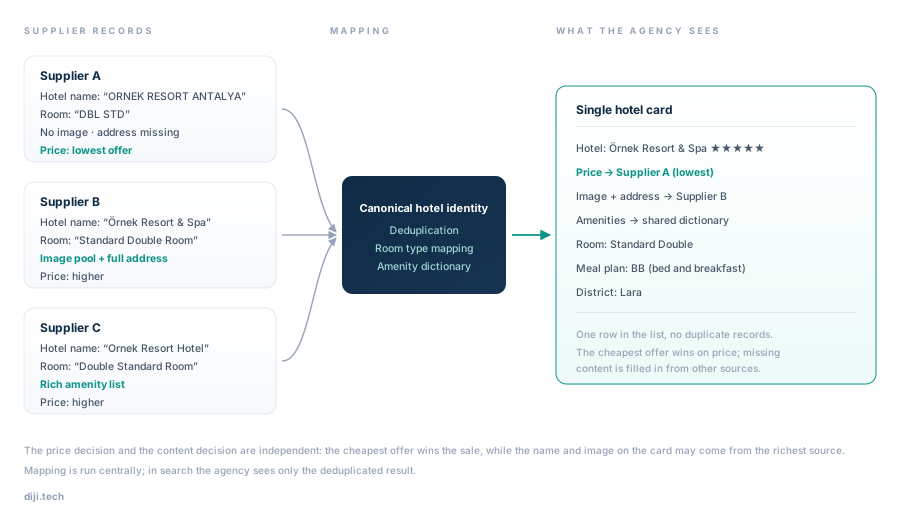
Three supplier records for the same hotel are bound to a shared identity; the price decision and the content decision are made separately.
The point that is most often missed, and that we get asked about most, is this: merging is not one decision, it is two.
- The price decision. Among several offers for the same hotel, the most cost-effective one wins the sales side. Staff no longer hunt for the cheapest source — the cheapest is already the price on the card.
- The content decision. The empty fields on the winning offer — hotel name, address, images and so on — are filled in from the other sources. So even if the record that wins on price is content-poor, the card still looks complete.
In practice this means that weak content from the best-priced supplier is no longer a barrier to selling. The property becomes sellable with a name, an image and an address, and you keep the price advantage.
One caveat belongs here too: mapping is run centrally. Hotel master data, mapping and amenity taxonomy management are not a screen inside the agency's own panel. What changes on the agency side is the output of a search — a deduplicated, content-completed, genuinely filterable list.
Room Type Mapping and a Shared Meal Plan Language
Even once the hotel is deduplicated the job is not finished, because the real comparison happens at room level. Room type mapping binds the differently worded room names of different suppliers to the same room type. Only then does "two offers at the same hotel" actually mean "two offers for the same room".
The second shared language is the meal plan. After price, the meal plan is the most decisive field when comparing two offers, and suppliers write it in wildly different ways. That is why we reduced meal plans to six canonical codes.
| Code | Meaning | Spellings found in supplier text (examples) |
|---|---|---|
| RO | Room only | "Room Only", "No meal", "Accommodation only" |
| BB | Bed and breakfast | "Bed & Breakfast", "Breakfast included" |
| HB | Half board | "Half Board", "Dinner, bed and breakfast" |
| FB | Full board | "Full Board", "Three meals included" |
| AI | All inclusive | "All Inclusive", "All-in" |
| UAI | Ultra all inclusive | "Ultra All Inclusive", "Ultra All-in" |
The decision rule is simple: two offers can only be compared on price if they share the same room type and the same meal plan code. The gap between two offers on different meal plans is not a discount, it is a difference in scope.
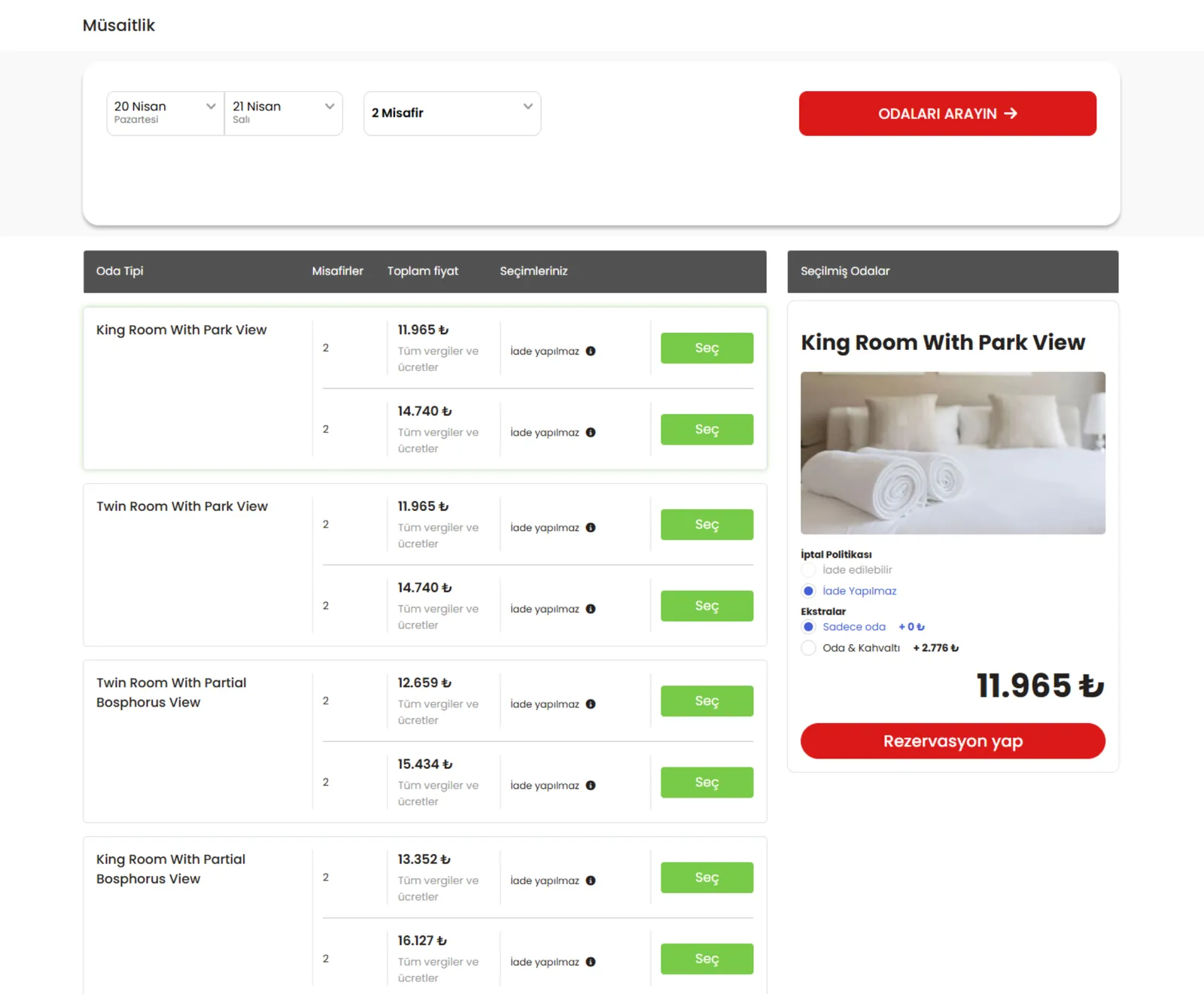
Room selection screen: room types are listed, the image and cancellation policy of the selected room appear on the right, and the meal plan option is shown together with its price difference.
Amenities: The Shared Dictionary That Makes Filters Work
Amenities are the filter users reach for most and the one that breaks most easily. Without a shared dictionary the filter works technically but not commercially: it returns results, just not all of them. Sources that spell an amenity differently fall outside the filter, and the user concludes that "this site does not have many hotels with parking".
With mapping, amenities are normalised in a central dictionary, and concept and theme information is enriched the same way. The result becomes visible in two places:
- In the search filters, amenity and theme selections now catch the same set of records regardless of which source they came from.
- On the hotel card, some amenities are written out as text and the rest are shown as a counter. A counter such as "+43" on the card is the number of amenities recorded for that property; the user gets a rough sense of how well equipped it is without opening the detail page.
District and Region Breakdown: A City Name Is Not a Destination
"Dubai" is not a destination, it is a city. When a customer wants to stay in Dubai Marina and instead gets hundreds of results spread across the whole city, that is the quietest way a sale is lost: nobody sees an error message, nobody complains, the search is simply abandoned.
Location autocomplete now recognises four kinds of input: region, district, airport alias and hotel name. Type a neighbourhood and you get the district; type an airport code and you get its surroundings; type a hotel name and you land on the property directly. The location filter beside the result list shows the district breakdown with counts, so the user can see how many hotels sit in each neighbourhood without clicking anything.
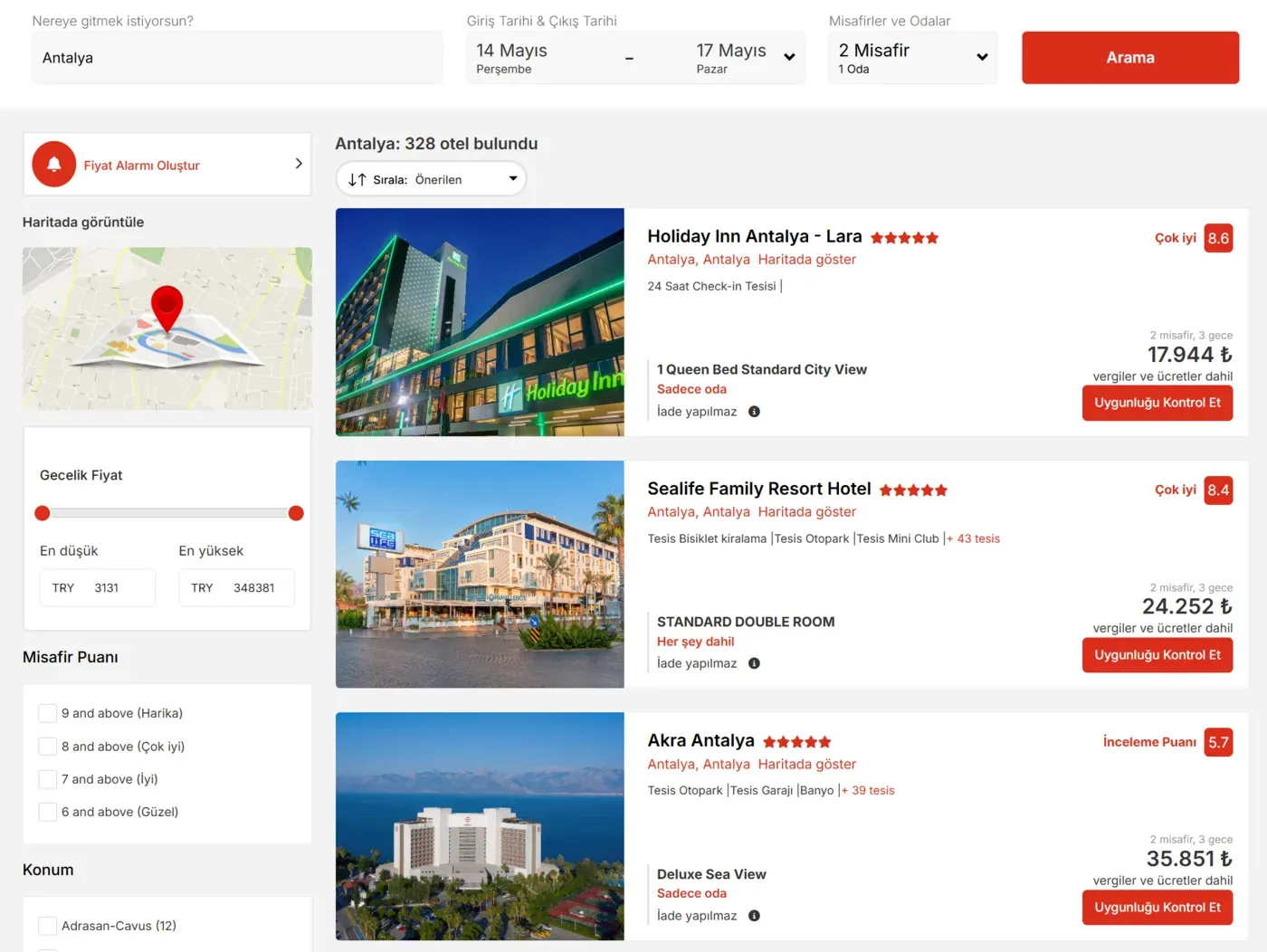
Result screen: on the left, guest rating and a location filter with per-district counts; on the right, hotel cards with image, star rating, amenity counter and a room/meal plan line.
The price alert feature we announced earlier sits in that same left-hand column. Working together, the two let you keep an undecided user in the right district and bring them back when the price moves.
Hotel and Room Images: One Pool, Cross-Filled
The image is the single element that decides whether a card in a hotel list gets clicked. A card without a photo is skipped no matter what its price is. With mapping, images are also collected in a single pool, and this works in two directions:
- On supplier hotels: a record with no image is fed from the record of the same hotel that does have images. The card fills up, and the source with the price advantage becomes sellable.
- On your own contracted hotels: the hotel detail consists of six tabs, one of which is images. Alongside the hotel-level gallery, images are also held at room level — the photo on the right of the room selection screen above is precisely the image of the selected room.
The practical outcome: the shortlist you send a customer comes out with the same visual quality whatever its source.
Go-Live Checklist
Mapping runs in the background, but on the day you switch it on we recommend checking these points by hand:
- Take a baseline measurement. Search your three best-selling destinations and note how many times the same hotel appears in the list and how many cards have no image. You cannot reconstruct this number afterwards.
- Test your three most-used amenity filters. Compare the result count with the filter on and with it off.
- Run two district searches. Type a district or neighbourhood instead of the city name and confirm that the results really are in that area.
- Open two offers for the same hotel. Check that the room type and the meal plan code read the same in both; if they differ, do not compare the prices.
- Fill in the image tab for your own contracted hotels. If the hotel gallery and room images are missing, your own property looks weak next to supplier hotels.
- Brief the team on the meal plan code set. Shared knowledge of what RO, BB, HB, FB, AI and UAI mean prevents the wrong scope being described to a customer.
- Update the comparison habit. The "I'll find the cheap one myself" reflex is now unnecessary; the price on the card is already the most cost-effective offer.
How to Measure Mapping Quality
Mapping is not a feature you switch on and declare finished; it is a quality job that has to be measured. We recommend measuring the four items below in your own installation before and after go-live. We are not publishing a reference ratio — the only meaningful comparison is your own before-and-after figure.
| Measurement | How to look at it | Which decision it feeds |
|---|---|---|
| Duplicate row count | For a fixed destination and date, how many times the same hotel appears in the list | Whether deduplication is genuinely working |
| Share of cards with no image or address | The proportion of first-page cards missing a photo or an address | The reach of content completion and which source stays weak |
| Amenity filter result deviation | The difference in result count between the filtered and unfiltered version of the same search | Whether the amenity dictionary has settled in that destination |
| District filter usage rate | The share of sessions that use the district filter, and how those sessions convert | The contribution of district breakdown to sales, and which districts to promote |
Repeat the measurements rather than taking them once, and always with the same destination and the same date range. A different date means different availability, and when availability changes the measurement loses its meaning.
Limits and Notes
What this capability does not do matters as much as what it does. The following are out of scope:
- Mapping management is not a screen in the agency panel. Hotel master data, room types and amenity taxonomy are run centrally. Manual intervention in the mapping result by the agency is outside the scope of this announcement.
- There is no sale of extra services on a hotel booking. The difference you see in room selection is a meal plan option; it should not be confused with extra service sales on the flight side.
- On your own contracted hotels, only hotel and room images are uploaded. There is no contract document upload or storage.
- There is no channel manager integration. There is no flow that pushes your own inventory's rates and allotment to an external channel manager or pulls them from one.
- There is no export of hotel inventory as an external XML/API feed.
- There is no group booking (block allotment) module on the hotel side.
- Bulk guest or room lists cannot be imported via Excel or CSV.
- Automatic booking status updates only work with suppliers that support them; we make no promise of "automatic status tracking with every supplier".
- There is no price differentiation by guest nationality.
Mapping is a quality layer that operates on the records overlapping with the source catalogue, and no mapping approach is flawless. That is why we recommend tracking the measurements above regularly after go-live and telling us about any destination where you see a deviation.
Frequently Asked Questions
Will I keep seeing the same property duplicated across five sources?
No. Each supplier's hotel code is bound to a shared hotel identity and the search result is deduplicated on that identity. You see a single card; the system does the work of comparing how many sources quoted for that property.
If the cheapest offer wins, does the image on the card also come from that supplier?
Not necessarily. The price decision and the content decision are independent of each other. The most cost-effective offer wins on price, while missing fields such as hotel name, address and images are filled in from the other sources. The aim is to make a source with weak content but a good price sellable.
How can the same room type at different suppliers be treated as identical?
Room type mapping binds room names written differently by suppliers to the same room type. On the meal plan side the canonical code set RO, BB, HB, FB, AI, UAI is used. For two offers to be comparable, both the room type and the meal plan code must match.
Why did the amenity filter sometimes return incomplete results?
Because every supplier writes the same amenity differently and the filter does not treat those spellings as equivalent. Once amenities are normalised in a shared dictionary, the filter catches the same set regardless of which source a record came from.
Do my own contracted hotels go through this flow as well?
Your own contracted hotels are listed in the same search results as supplier hotels. The hotel detail consists of six tabs, one of which is images; by uploading your hotel and room images there you make your own property look as complete as the supplier hotels.
Am I the one managing the mapping?
No. Hotel master data, mapping and amenity taxonomy are run centrally. What changes on your side is the output of a search: a deduplicated, content-completed and genuinely filterable list.
What You Can Do Today
- Take your baseline measurement. Search your three best-selling destinations and note today how many times the same hotel appears and how many cards have no image.
- Complete the image tab for your own contracted hotels. List the properties with gaps in the hotel gallery or room images and close them.
- Share the meal plan code set with your sales team. A team that knows what RO, BB, HB, FB, AI and UAI mean will not describe the wrong scope to a customer.
If you run hotel sales through a network of sub-agencies, you can see how the mapping price rule combines with the allotment side on the Hotel Booking and Inventory System for Agencies page. If you operate a storefront selling to end consumers, you can see how the same mapping shapes the search and filter experience on the Hotel Booking Software page.