
The request at the other end of the phone usually sounds like this: "I'm flying out of London, staying two nights in Munich, then continuing to Barcelona, and I fly home from Barcelona." To serve that single request, your staff open three separate searches, issue three separate tickets and track three separate files. They type the passenger details three times, check the price movement three times and, when a cancellation lands, make three separate decisions. Then the traveller calls again: "My suitcase will be over the baggage allowance, can I buy extra?" and "My mother is diabetic, can we sort out the meal on board?" Those two questions usually leave the file altogether — they end up at the airport counter, in a call centre, or on the airline's own website. Which means the traveller's experience is broken up, and the party that completes the sale is no longer you.
At diji.tech we have brought all three of those requests inside the same sales flow with three new capabilities: multi-city flight search, extra baggage sales and in-flight meal selection (SSR). All three run on two surfaces at once: in the B2C storefront the end customer makes the choice, and in the B2B panel agency staff add it on the customer's behalf. Below we explain which operational problem each one solves, when it should and should not be used, what to check before you switch it on and — just as importantly — what these features do not do.
Multi-city search: one file instead of three
Multi-city is the third search type alongside one-way and round trip. You define a minimum of 2 and a maximum of 6 legs in a single search; each leg is entered with its own departure point, arrival point and date. The results land in a single selection flow and the sale closes in one booking file.
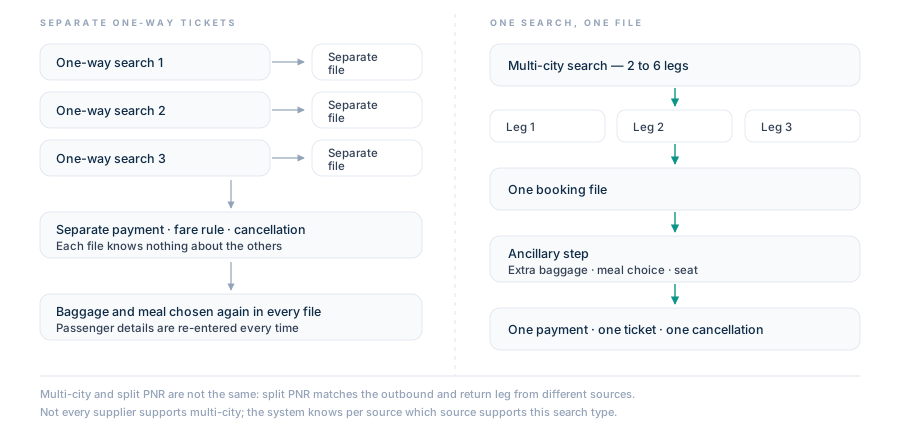
On the left, three separate one-way searches produce three files, three payments and three separate cancellation decisions. On the right, the same journey is defined as 2–6 legs in a single multi-city search and closes in one file.
The difference is not cosmetic, it is operational:
- Passenger details are entered once. Typing a name, passport and contact details three times across three files means three times the typo risk. Name corrections are usually chargeable on the airline side; preventing the mistake is cheaper than fixing it.
- The cancellation decision is made in one place. In three separate files, cancelling one of them knows nothing about the other two. When a traveller drops the second leg, staff have to link the three files manually.
- The ancillary step runs once. Instead of repeating the baggage and meal selection three times, you do it once in a single flow.
- The decision is made from one list. The search results carry filters for airline, supplier, price range, number of stops, departure time and baggage (cabin/checked); in the branded fare comparison you see the baggage allowance, the refund/change condition and the fare's inclusion list side by side. You are not forced to make the baggage decision separately from the ticket decision.
One point deserves emphasis: multi-city search and split PNR are not the same thing. Split PNR means taking the outbound leg from one source and the return leg from another and matching them. Multi-city means defining a single journey that has several legs. They are separate capabilities and they require separate decisions. Also, not every supplier supports multi-city search; the system knows which source supports this search type on a per-source basis, but your sales team knowing that map too will make you faster.
Which request needs which search type: a decision table
The place where staff lose the most time is putting an incoming request into the right search type. You can use the table below as an internal rule.
| Incoming request | Correct search type | Reason |
|---|---|---|
| Outbound and return on the same city pair | Round trip | A single pair of legs; multi-city is unnecessary, and round-trip fares are usually priced differently from the sum of two one-ways |
| A stay in an intermediate city, return from a different city | Multi-city | 2–6 legs in one file; passenger details and ancillaries are entered once |
| Outbound cheaper on one source, return on another | Round trip + split PNR | This is a source-matching decision, not a leg definition |
| The number of legs exceeds 6 | Split into two files | The upper limit of multi-city search is 6 legs; write your splitting rule in advance |
| One-way only, return still undecided | One-way | A second file is opened once the return is confirmed |
| Selling from your own block seat stock | Charter Flight Ticket Software | Multi-city search belongs to scheduled flights; charter sells your own seat inventory and contains no multi-city search |
Extra baggage: a line item closed before the airport counter
Extra baggage is the easiest line item in a sale to miss. Travellers usually realise they will exceed their allowance after they have already bought the ticket. If you are not offering an option at that moment, the item gets resolved at the airport counter: neither the decision nor the collection is yours, and on top of that the traveller remembers it as a disruption.
We have brought extra baggage sales inside the sales flow. At the payment step, the traveller sees their existing baggage allowance per leg — how many pieces and how many kilos they are entitled to on each departure is written on the screen — and can buy additional baggage allowance on top of it. On the B2B side, agency staff perform the same operation on the customer's behalf; the extra baggage allowance is added to the booking.
The commercial side is just as clear: extra baggage is a relatively small item next to the ticket price, which means the traveller's decision threshold is low. On routes where your ticket margin is squeezed by competition, ancillaries are one of the most practical ways to lift the average value per file. If you want to measure it, two simple indicators are enough: the ratio of bookings with extra baggage to total bookings, and the difference in average file value between files with extra baggage and files without it.
Meal selection: a matter of suitability, not comfort
In most sales copy, in-flight meal selection is filed under "comfort" — yet the majority of these requests come from necessity. A diabetic traveller, a child on a gluten-free diet, a group eating halal or vegetarian: none of these fall into "nice to have", they fall into "the trip goes badly without it". The industry calls this SSR (Special Service Request).
Meal selection is now inside the same sales flow. The traveller chooses from the meal list presented per flight leg; the list shows each option's image, name and amount, and the choice is confirmed and added to the order. On the B2B side, special meals and dietary preferences are entered into the booking by agency staff.
The operational meaning is this: every time this request is handed off to the airline's call centre, ownership of the file becomes blurred, and the traveller ends up saying "I asked my agency and they sent me to the airline." When you handle the request inside your own flow, the record stays with you and the answer to any after-sales question sits in one place. We recommend standardising the question your agents ask: "Does any of your passengers have a special dietary requirement?" — one sentence saves half a file.
Where the ancillary step sits in the flow
What all three capabilities have in common is that they are gathered at the same point in the sales flow. At the payment step, after the passenger details have been entered, the baggage upgrade, meal selection and seat selection sections open in sequence; every choice made is reflected in the order summary, so the traveller or the member of staff sees the total change as they select.
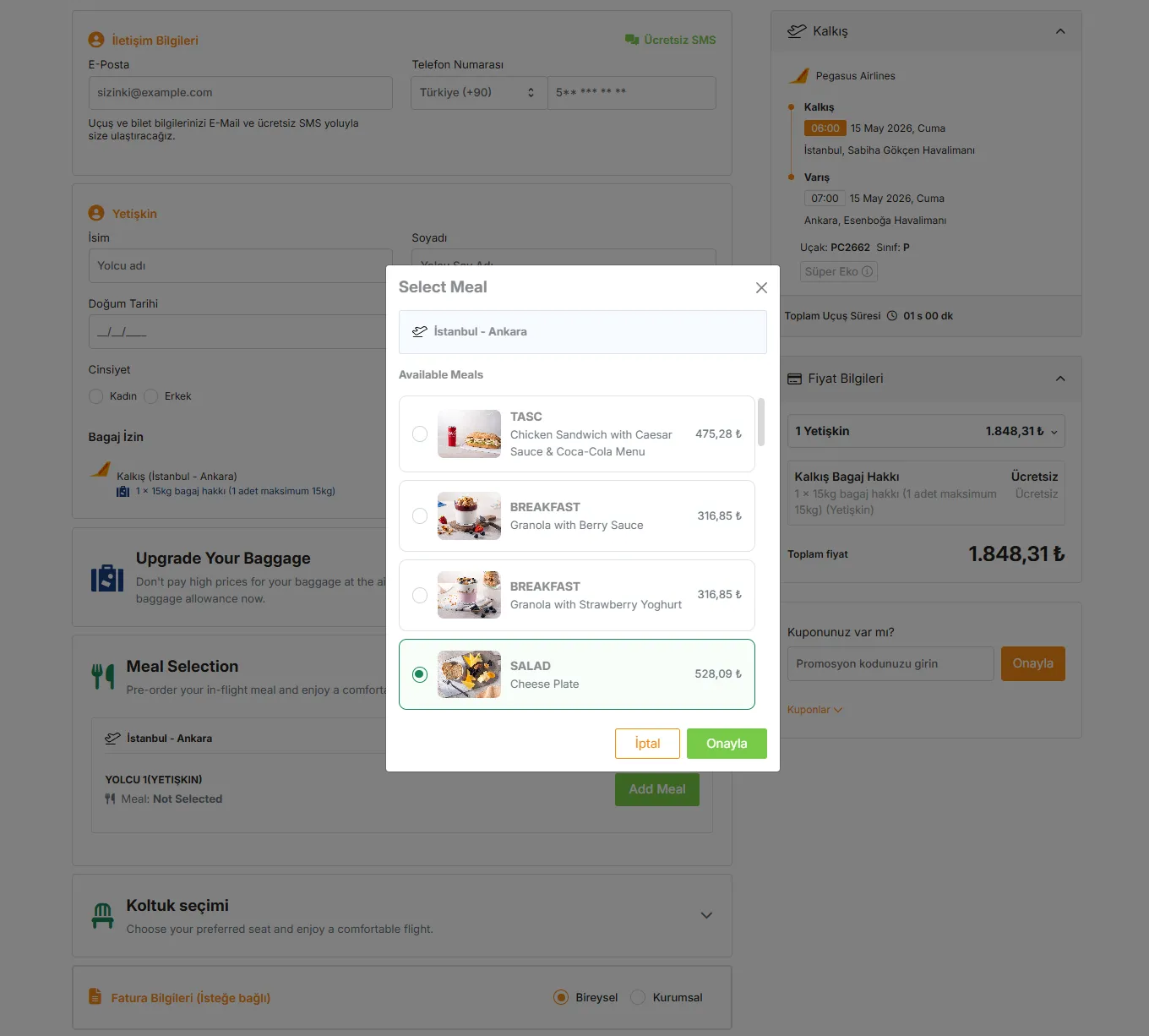
The payment step in the B2C storefront: the baggage upgrade section below the passenger details, then meal selection with the meal list expanded, and the seat selection heading at the bottom.
Seat selection sits in the same step; the cabin plan opens with passenger tabs, and seat states (available, your seat, another passenger, occupied) and seat types (front section, extra legroom, emergency exit, standard) are distinguished by a legend.
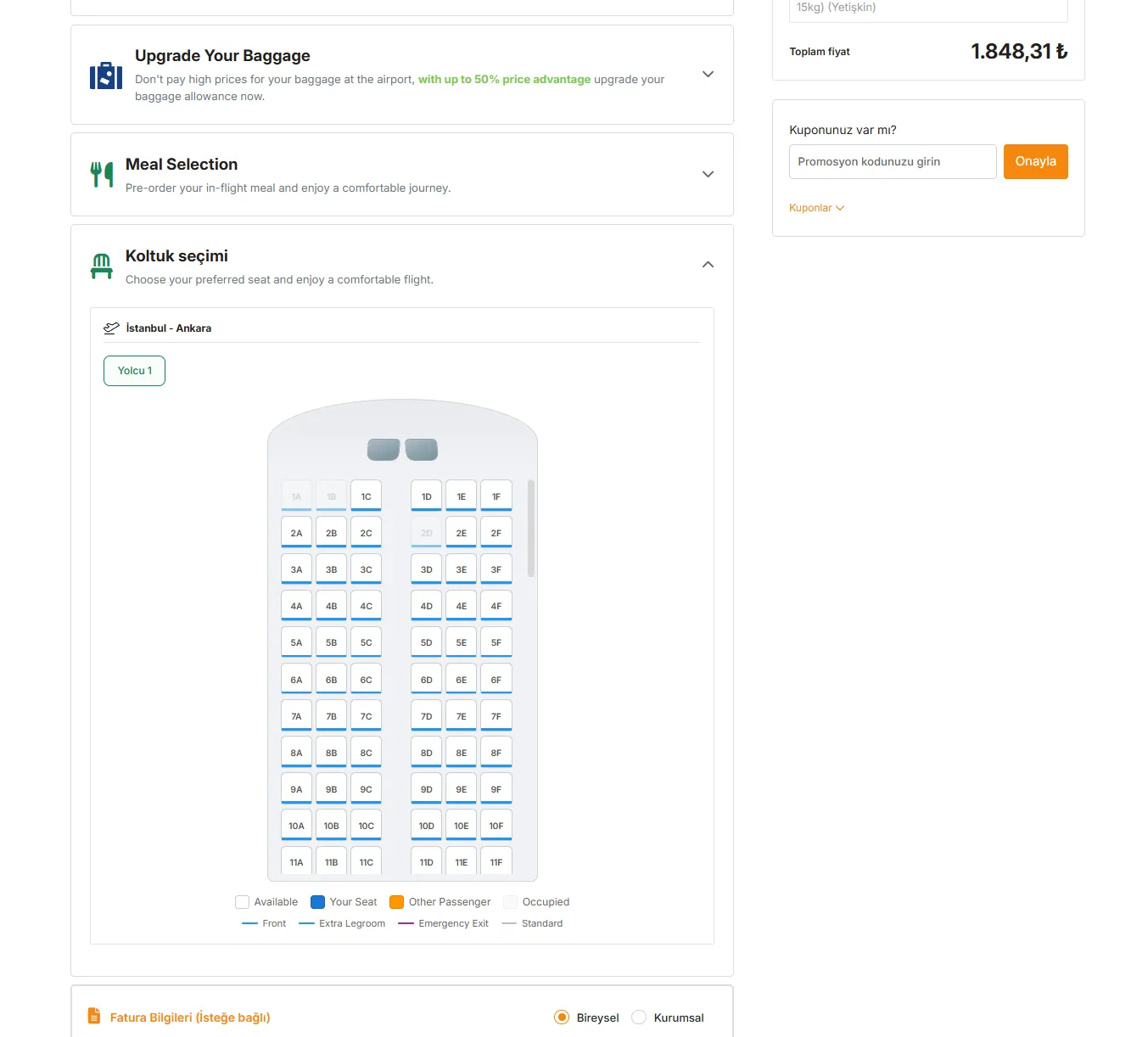
Seat selection is part of the same step: the cabin plan, passenger tabs and the legend that distinguishes the seat types.
The difference between the B2C storefront and the B2B panel
The same capability behaves differently on the two surfaces. Keep this distinction clear when you choose a product and when you train your staff.
| Axis | B2C storefront | B2B agency panel |
|---|---|---|
| Who selects | The end customer chooses for themselves | Agency staff add it on the customer's behalf |
| Price | Everyone sees the same storefront price | The same search is priced differently for each agency through the pricing rule chain and currency conversion |
| Collection | The customer's card | Agency current account balance and credit limit, or card |
| Document | One view | Two views: the service line is separate in the agency view and embedded in the base price in the customer view |
| Record | The customer owns the order | The selling user and the agency are kept separate; the agency can write its own file number onto the booking |
This distinction is not a detail, it determines which product you need. If you sell directly to the end customer you are on the Flight Ticket Software side; if you sell to a dealer network you are on the Flight Ticket Agency System side. Ancillaries exist on both sides, but the pricing, collection and document behaviour changes according to the table above.
Go-live checklist
Close the following items in order before you go live:
- Draw up your source map. List which of your suppliers support multi-city search and put that list somewhere the sales team can see it.
- Confirm which sources the ancillaries are open on. We are not publishing a supplier or airline list in this announcement; the situation in your own installation should be clarified with your implementation team.
- Check what your pricing rule does to the ancillary line. Verify with a test booking whether your agency-level pricing rule is applied to the ancillary amount; do not proceed on assumption.
- Run it end to end in a test environment. Instead of training staff on live inventory, have them open a multi-city search in an isolated test environment and complete an extra baggage and meal selection.
- Verify the baggage allowance line by eye. Check on a test file that the existing per-leg allowance shown on the passenger form matches the actual fare.
- Write a business rule for the 6-leg limit. Decide in advance how you will split the file on longer journeys and by which reference you will link the two files.
- Choose where you will measure. There is no separate ancillary profit report in the flight module; decide from the start in which report and at which breakdown you will track ancillary revenue.
- Update your agent script. Make the extra baggage and special meal questions a standard part of your call flow.
Limits and notes
We are writing this section deliberately, because what a feature does not do affects planning just as much as what it does:
- Multi-city search is not available on every source. It is a supplier capability; do not expect this search type on sources that do not support it.
- There is no multi-city search on the charter side. The charter product, where you sell your own block seat stock, is a separate product and contains no multi-leg search flow.
- The upper limit is 6 legs. Longer routes require you to split the file; the system will not merge them for you.
- Ticket changes are not supported on split PNR bookings. Do not expect a date change on a file matched from different sources.
- There is no bulk processing. Ticketing, cancellation and refund work one booking at a time, and ancillaries are part of that flow. Processing a group of a hundred people in a single action is not what this product does.
- There is no rule-based auto-ticketing engine. You cannot define a rule of the "issue automatically under these conditions" type.
- Raw fare rules text is not shown on screen. What you see is the brand-level baggage allowance, refund/change status, penalty amount and inclusion list.
- There is no fixed "service fee" field independent of the markup. The service line on the document is derived from the margin.
- The behaviour of the ancillary amount after cancellation, refund and date change is outside the scope of this announcement. We are not making a commitment on this here; it should be confirmed in your installation before you sell.
- We are making no pricing claim about seat selection in this article. The selection surface exists on screen; the charging behaviour varies by source.
Frequently asked questions
How many legs can I define at most in a multi-city search?
A minimum of 2 and a maximum of 6 legs. Each leg is entered with its own departure point, arrival point and date. Journeys with more than six legs require you to split the file; we recommend writing your splitting rule down within the team in advance.
Is multi-city search the same thing as split PNR?
No. Multi-city search means defining a single journey with several legs in one file. Split PNR means taking the outbound leg from one source and the return leg from another and matching them. They are separate capabilities, and ticket changes are not supported on files created via split PNR.
What exactly is a meal preference (SSR)?
SSR stands for "Special Service Request"; it is the standard field where special dietary and similar requests during the flight are recorded on the booking. On the product side, the traveller chooses from a meal list presented per leg. We are not committing to a list appearing on every flight and every source; this must be confirmed per source in your installation.
Can agency staff enter extra baggage and meals on the customer's behalf?
Yes. On the B2B side, extra baggage allowance is added to the booking and special meal preferences are entered by staff. The difference from the B2C storefront lies less in the selection than in pricing and collection: the same search returns to each agency with its own pricing rule, and collection can also be made against the current account balance.
How does the ancillary selection affect the total?
Selections are made at the payment step and are reflected in the order summary, meaning the total updates on screen as each choice is made. That way the traveller or the member of staff sees the effect of the ancillaries on the total before going to confirmation.
Can I run a multi-city search on my charter flights as well?
No. Multi-city search is a capability on the scheduled flight side. The charter operation, where you sell your own block seat stock, is a separate product and contains no multi-leg search flow; explain this distinction to your staff when you position the two products on the same screen.
What you can do today
- Open a test file. In an isolated test environment, run a three-leg multi-city search, complete an extra baggage and meal selection end to end, and verify the change in the order summary by eye.
- Draw up your source map. Collect on a single page which of your suppliers support multi-city search and which sources the ancillaries are open on; this will be the sales team's first question.
- Add two questions to your call script. "Will your baggage allowance be enough?" and "Do you have a special dietary requirement?" — these two sentences are the cheapest way to stop a file being handed over to the airport.
To see what ancillaries look like on the end customer side, take a look at the Flight Ticket Software page; for the equivalent on the dealer network side, see the Flight Ticket Agency System page, and request a demo for your own installation.