
In a company that runs its own vehicles and its own drivers, the day usually looks like this: where the car is lives on a whiteboard, the rental agreement lives in a folder, the inspection date lives in a reminder on somebody's phone, and last month's profit lives nowhere at all. The cost of that scattering is not abstract. Promising the same car to two customers, writing the same driver onto two jobs, noticing a mileage overrun only after the car has already left, sending a vehicle out with an expired inspection — every one of those is money leaving the building. Agency software does not fix this, because agency software was designed to sell somebody else's inventory.
At diji.tech we have released two new systems for companies that operate their own inventory: Car Rental Company Software and Transfer Company Software. What they have in common fits into one sentence: the car is yours, the driver is yours, and so is the risk of it sitting idle. That is why the centre of gravity in these products is not "connect to more suppliers" but price, assign and close out the asset you already own.
Why agency software and company software are not the same thing
This is the misunderstanding we run into most often. An agency product searches a supplier's inventory, sells it, and applies a markup rule on top. An unsold car or an unsold seat never shows up on the agency's balance sheet. In a company product, every unsold day comes back as depreciation on a vehicle with a specific licence plate.
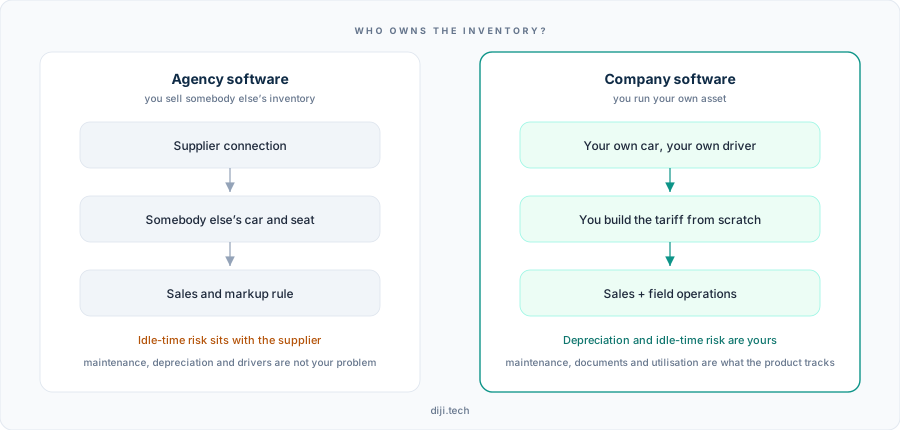
Two products that look like the same sales screen part company at inventory ownership; wherever the risk sits, that is where the product's centre of gravity sits too.
| Axis | Agency software | Company software |
|---|---|---|
| Source of inventory | Supplier connection | The company's own vehicles and drivers |
| How the price is built | Markup rule on the incoming fare | The tariff is built from scratch by the company |
| Critical risk | Supplier outage, commission margin | Depreciation, maintenance, idle time, document validity |
| Post-sale layer | Booking follow-up | Field operations: handover, dispatch, damage, driver earnings |
| Measure of success | Sales volume and margin | Utilisation per vehicle and driver, profit per job or rental |
The decision rule is simple: if you buy the inventory, you want the agency product; if you own the inventory, you want the company product. For businesses doing both, the agency-side equivalents live on the Car Rental Software and Transfer Software pages.
Car rental: you sell a class, you hand over a plate
On the rent-a-car side, the first thing to set up is not the vehicle list — it is the class catalogue. A customer does not buy a licence plate; they buy a class, such as economy automatic or compact diesel. The system works on the same logic: availability and price run at class level, and the plate is attached at the moment of handover. The payoff is direct — as long as you can swap two cars of the same class for one another, one late return does not stop the sale.
The vehicle record holds equipment, a photo gallery and the class code, and you can define duration constraints per vehicle (for example, closing a particular car to short-term rentals). The tariff is then built in these layers:
- Daily, weekly and monthly tiers are entered with separate unit prices. The rule: unless you pull the weekly unit price below the daily one, rentals longer than three days go to your competitor, and the monthly tier is what sets the floor price for contracted corporate fleet business.
- Season period definitions split summer and winter pricing for the same class.
- Mileage allowance and excess fee sit on the tier itself. If you want to sell unlimited mileage, you leave the mileage allowance on that tier empty.
- Insurance coverages and insurance packages are defined separately, then presented to the customer as a single package line.
Extra items — additional driver, child seat, navigation, winter tyres and so on — can be charged in two different ways: per day or per rental. Getting that choice right determines a large share of the revenue. A practical rule: define anything the customer consumes every day (additional driver, extra mileage package) per day, and anything set up once and returned (child seat, delivery fee) per rental.
The deposit lives in the rental conditions on the vehicle record, flows through to the quote and the agreement, and the pre-authorisation record is tied to the rental. Minimum driver age and minimum licence years are defined in the same place, and any field you leave empty is simply not shown on the quote — no default is invented for you.
Handover and return: profit is protected where the form is filled in
In car rental, profit is not settled when the agreement is signed. It is settled when you get the car back. That is why the system has two separate forms: Hand Over and Take Back.
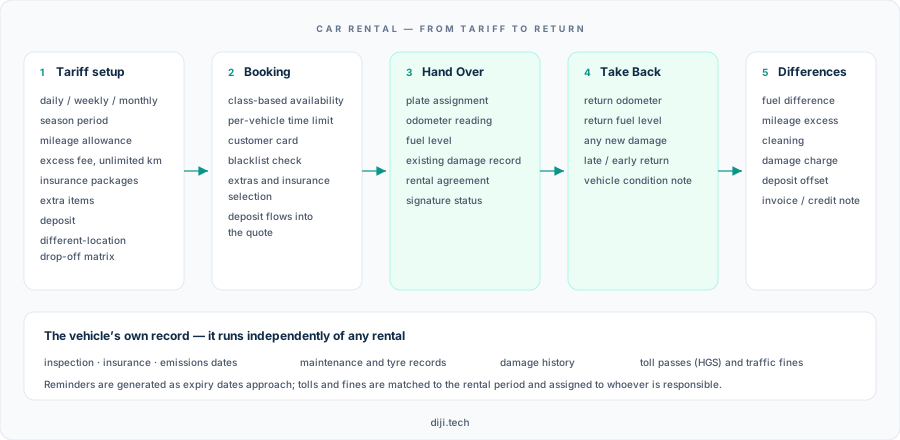
The mileage, fuel and damage recorded at handover come back at you as a reference on the return form; the difference items are generated from there.
At handover the plate is assigned, the odometer is read, the fuel level and existing damage are marked, the rental agreement goes on record and its signature status is tracked. On return the same fields are filled in again and the difference is reflected item by item: fuel difference, mileage excess, cleaning, damage charge, deposit offset, and an invoice or credit note where required. What defuses the argument is that both forms sit on the same record.
The vehicle also has a life cycle independent of any rental: damage history, inspection, maintenance and tyre records, electronic toll passes (in Turkey, HGS) and traffic fines. Tolls and fines are matched to the rental period and assigned to whoever is responsible — which closes the "whose period does this fine fall into" question inside the operations panel. Reminders are generated as inspection, comprehensive insurance and emissions expiry dates approach.
There is a separate fee matrix for one-way drop-offs at a different location. The real cost of a one-way rental is bringing the car back, and if you do not fill in that matrix according to the true return cost between branch pairs, popular one-way routes will pile your fleet up in the wrong city. Vehicle transfers between branches are also recorded, and a branch user only sees their own branch's records.
Transfer: not zone pricing, but a pickup x dropoff matrix
The question we get most on the transfer side is "is there zone pricing?". The clear answer: there is no zone-based tariff. The price is built either on a point-pair route or per kilometre. What exists instead is a pickup x dropoff matrix: you select pickup and dropoff points on a grid, generate routes in bulk, update prices in bulk, and define both directions at once. As an alternative you define a per-kilometre price plus a base fare — that base fare is the line item that stops the price from collapsing on short distances.
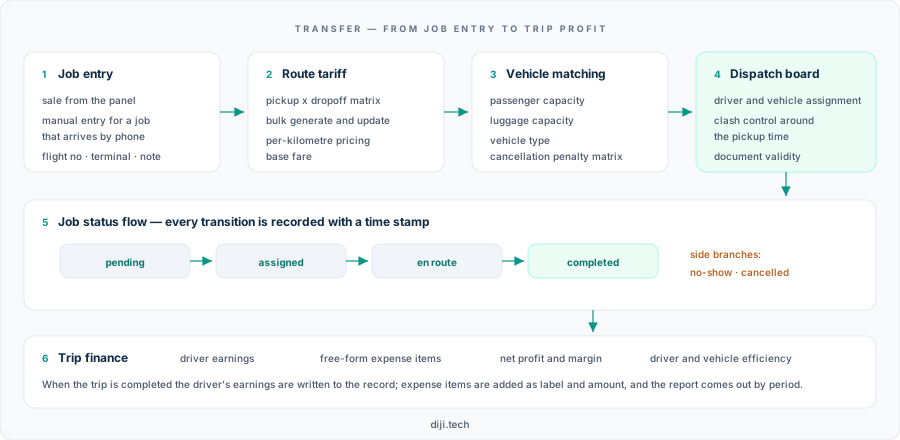
Wherever the job comes from, it enters the same flow; after dispatch the job statuses advance with time stamps, and when the job closes the financial items are written to the record.
Vehicle matching runs on passenger and luggage capacity, cancellation terms are defined with an hour-based tiered penalty matrix, and exceptions can be granted at vehicle level. A job that arrives by phone is entered manually and drops into exactly the same operations flow.
The most critical behaviour of the dispatch board is clash control. The rule is this: there is a time window around a job's pickup time, and a resource that already has work inside that window cannot be selected — the system refuses the assignment and tells you which job it clashes with. Because driver licence, inspection and insurance validity dates sit on the driver and fleet records on the same screen, the risk of sending out a driver with an expired document also drops.
Job statuses — pending, assigned, en route, completed, with no-show and cancelled as side branches — are recorded with a time stamp at every transition. The time stamp is not decoration, it is evidence: when a customer says "the car never came", what gets discussed is the record. When the job closes, the driver's earnings are calculated and written to it, and you add the expenses belonging to that job line by line. Profitability is reported by period and currency, and the driver and vehicle reports additionally show job counts and completion rates.
The same installation also opens the company's own sales storefront
On the car rental side the installation produces more than an admin panel: it also produces a B2C storefront the company sells under its own brand. The storefront uses the same inventory and the same booking services; no separate product installation is required. A visitor picks a branch and dates, narrows down with class, transmission and fuel filters, chooses the insurance package and extra services on the vehicle detail page, and enters driver, invoice and card details in the final step. The storefront's pages, menu, images, theme and interface texts are edited from the panel, and you connect your own domain via DNS.
The sales storefront in this announcement is on the car rental side. The transfer product is panel-centric: work is entered from the panel or by phone, and operations and finance run in the back office.
A 14-day free trial on car rental
For car rental companies there is a self-service route where you can set the system up and see it for yourself. The sign-up wizard has three steps — Address & Site, Account & Company, Confirmation — and no step asks for a credit card. When sign-up completes, your account, your admin user and your default head branch are created automatically, your site address is assigned automatically, and your site goes live. You connect your own domain afterwards via DNS and customise the logo, content and brand colours after publication. At the end of the trial, package selection is made inside the system.
Trial address: https://car.diji.tech/?l=en
No free trial is offered on the transfer product; for transfer, go-live is planned around defining your vehicle and route lists.
Go-live checklist
For car rental:
- Set up the class catalogue before the vehicle list. With no classes, neither price nor availability has anything to attach to.
- Do not leave the weekly and monthly tiers empty. If you only define a daily price, you cannot match a competitor's long-rental quote.
- Enter the mileage allowance per tier; leave the field empty on the tier you intend to sell as unlimited.
- Mark, one by one, whether each extra item is per day or per rental. Do not trust the default.
- Fill in the different-location drop-off matrix with the real return cost for each branch pair.
- Define the deposit, minimum driver age and minimum licence years on the vehicle record; an empty field never appears on the quote.
- Set up the branch hierarchy and user roles in the first week. If data isolation is switched on later, historical records stay mixed.
- Plan on defining vehicles one at a time — there is no bulk vehicle import.
For transfer:
- Standardise pickup and dropoff points first (airport, terminal, hotel, district), then generate the matrix.
- Always enter the base fare; in per-kilometre pricing it is the only line that protects short distances.
- Enter vehicle types with passenger plus luggage capacity, not only by make and model.
- Define the cancellation penalty tiers with hour thresholds and override them at vehicle level where an exception is needed.
- Enter driver document expiry dates on the records; the check only works if the data is there.
- Standardise your expense item labels (fuel, parking, toll, refreshments) — a report is only meaningful with consistent labels.
What do you measure?
On the transfer side the system gives you three things directly: net profit and margin per job, job count and completion rate per driver, and vehicle utilisation. The threshold to watch in the first month is this — if the completion rate is low, the problem is not in your pricing, it is in your dispatch.
In car rental the measurement comes out of the records: the total of the return difference items (fuel + mileage excess + cleaning + damage), the deposit offset amount, the share of one-way rentals, and rented days per class. Those four numbers tell you whether your tariff is set up correctly without your ever opening the tariff page: if the return difference is permanently zero, your mileage allowance is more generous than it needs to be; if it is permanently high, you are manufacturing customer complaints.
Limits and notes
Knowing what a product does not do matters as much as knowing what it does:
- There is no zone-based tariff in transfer. The price is built on point-pair routes or per kilometre.
- There is no flight tracking in transfer. There are fields for flight number, terminal and meeting note; there is no automatic behaviour that shifts the pickup time according to a delay.
- There is no driver mobile app and no automatic job notification to the driver; assignment produces an in-panel record and an event log. There is no live vehicle tracking (GPS) either.
- No automatic driver name and plate notification is sent to the passenger after assignment. The current notification flow is limited to delivering and re-sending the booking confirmation.
- There is no shared (per-seat) transfer sale; pricing is per vehicle. Intermediate-stop charges and night surcharges are not applied either.
- There is no bulk vehicle import in car rental. The only import flow is for the electronic toll statement.
- What is tracked on the rental agreement is the record and the signature status; no external e-signature provider is connected.
- Availability works at class level, with duration constraints defined separately per vehicle. Maintenance and inspection records are kept and reminders are generated as expiry approaches; whether a maintenance record automatically removes the vehicle from sale must be confirmed separately for your installation.
- The storefront's payment step collects driver, invoice and card details. Which channel the actual collection runs through is clarified during installation.
Frequently Asked Questions
I have my own fleet and I also sell vehicles from other companies. Which product should I buy?
The measure is inventory ownership. If the weight is on your own vehicles, start with the company product; if the weight is on selling somebody else's inventory, the agency product is the right one. For businesses running both sides, the setup is clarified in the onboarding conversation.
Is there a 14-day free trial for transfer as well?
No. The free trial and self-service setup are offered on the car rental side only. For transfer, the go-live schedule is planned according to the number of vehicle types and routes to be defined.
Does the system really stop me from writing the same driver onto two jobs?
Yes, and it is not a warning-level block — the record is never created at all. If the driver or vehicle you select is already tied to another job in the window surrounding that job's pickup time, the system rejects the assignment and shows you the clashing job. The update and the event record written alongside the assignment also move as one piece, so a half-finished assignment never hangs on the board.
How do I collect the differences that come up at the end of a rental?
The mileage, fuel and damage records on the handover and return forms are compared; the difference items (fuel, mileage excess, cleaning, damage) are reflected one by one and the deposit offset is made on the same record. The invoice and credit note record are tied into the same flow.
Does the system arrive with a ready-made price list?
No. A company product does not ship with a ready price list; you build the tariff from scratch with classes, duration tiers, seasons, mileage packages and extra items. That is the fundamental difference from the agency logic of putting a markup on a supplier's fare.
Can my own website be published from this system?
On the car rental side, yes: the installation produces a sales storefront running under the company's own brand and own domain, with content and theme managed from the panel. Within the scope of this announcement, the transfer product is panel-centric.
There are three things you can do today:
- Write out your class list. Decide how many classes you will split your fleet into — the whole installation hangs off that list. The transfer equivalent is writing out your vehicle types with passenger and luggage capacity.
- Mark your five best-selling routes, or your five most common rental duration patterns. Building the tariff from those gives you a result far faster than trying to fill in the entire matrix in one sitting.
- If you are on the car rental side, start the trial yourself: at https://car.diji.tech/?l=en you can open an account without giving a credit card and see the panel and the storefront in the same session.
For the full feature list: Car Rental Company Software · Transfer Company Software