

In the charter business a seat is a good you have already bought before you sell it. The operator who charters the aircraft pays months before departure; the aircraft takes off whether the seats are filled or not, and the cost stays the same. That is why the real problem of a charter operation is not "issuing tickets" — it is running down a finite stock at the highest possible revenue before the departure time. In the field this work is usually carried on a spreadsheet: outbound and return allotments live on separate tabs, seats are promised to sub-agencies over the phone, and which block has had its names entered is tracked through a WhatsApp thread. The outcome is familiar — the same seat is sold twice, allocated but unsold seats are noticed three days before departure, and demand arriving at a sold-out flight disappears without being written down anywhere.
At diji.tech we have extended our charter flight ticket system around these five pain points and released the new capabilities: block seat inventory, series flight generation, load-factor price tiers, agency-level allocation and unnamed block bookings. This article is not a feature list. It explains which operational decision each capability makes easier: at what level the allotment should be held, whether you burn off an empty seat with a discount or with a pricing policy, why the option period matters so much, and what the system does — and deliberately does not do — when the name list deadline arrives.
Why a charter seat is a stock item of its own
When you sell a scheduled ticket, the stock is not yours. You pull a live fare from a supplier and sell it; if the seat goes empty, you are not the one who loses. In charter the equation flips: the stock is yours, the risk is yours, and an empty seat is a direct loss. That single difference changes everything you should expect from software — allotment, allocation, load-factor pricing and waitlists all grow out of that stock ownership.
| Question | Scheduled ticket | Charter block seat | Group file |
|---|---|---|---|
| Whose stock is it? | The airline's / the supplier's | Yours (bought in advance) | Nobody's yet, still at quotation stage |
| Who carries the risk? | The supplier | You | Nobody, until the quote is accepted |
| What does an empty seat mean? | Not a loss | A direct cost | Not applicable |
| Who sets the price? | Supplier plus your markup | Entirely you | Negotiated with the airline |
| Where it lives in the system | Flight ticket agency system | Charter flight ticket system | Group booking management system |
In practice this distinction means there is no step called "connect a supplier" for your charter flight. The inventory is registered as an internal flight provider, and it is listed side by side with external supplier results on the standard flight search screen your sub-agencies already use. The agency does not have to log into a separate portal, and you do not have to open an extra integration.
Holding the block per leg: all or nothing
Keeping the charter allotment as a single number is the most common mistake in the field. On a round-trip series the outbound leg can be full while the return still has space; work with one counter and you will end up selling a seat you cannot deliver.
In the new structure every leg keeps its own seat counter. On a round-trip sale the demand is written to both legs together: if both legs have space the sale goes through, if one is full the whole sale is rejected. The number of sellable seats is always set by the most constrained leg. If your contract requires deliberate overselling, you no longer leave it to guesswork — you define a controlled overbooking allowance per flight, and the system sells up to that allowance and no further.
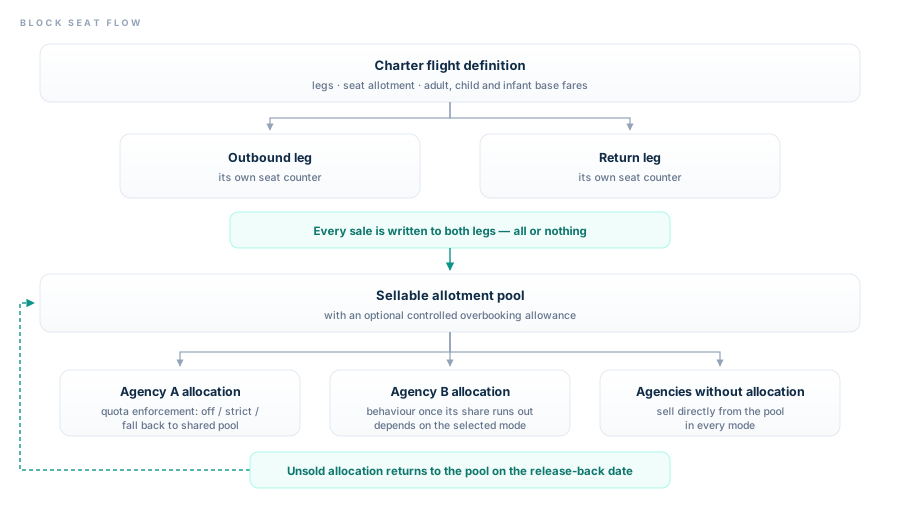
The flow of a seat from flight definition to agency allocation. An unsold allocation returns to the shared pool on the release-back date.
Building a season programme in a single form
A charter programme is rarely a single flight; it is usually a chain that repeats on the same weekday throughout the season. Opening that chain by hand takes time and carries the risk of skipping a week.
With series flight generation you define one template flight, set the repeat interval between 1 and 52 weeks, and the system produces the chained flight copies. Season definitions let you group and filter those flights as well, so a summer programme and a winter programme never get mixed up. What you gain in practice is this: a single fare or allotment mistake made at the season opening is generated from the template and fixed in one place, instead of being carried by hand across dozens of flights.
Managing the price with a policy as the load factor rises
The cost of an empty seat is fixed, but the value of the last seat is not. The classic reflex is to discount as departure approaches; that punishes the agency that bought early and burns your margin before take-off. The correct approach is the opposite: the price should rise as the flight fills.
Load-factor based automatic pricing lets you define tiers by occupancy band. Each tier works as a percentage or a fixed amount and can be switched on or off individually — you do not have to rewrite the fare to disable a tier in the middle of a programme.
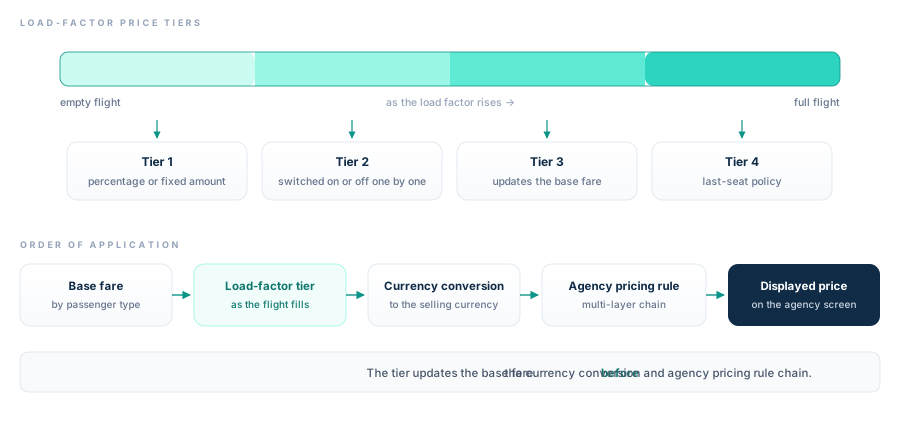
The tier updates the base fare before the currency conversion and agency pricing rule chain.
The order matters a great deal: the tier is applied to the base fare, and only then do the currency conversion and the agency-level pricing rule chain come into play. In other words, the rise in load factor is passed on proportionally to every agency without breaking each one's own commission structure. Because you define the base fare separately for adult, child and infant, the tier preserves the passenger-type distinction as well.
To avoid setting a pricing policy blind, enter the flight cost items into the system too. Once costs are in, you can see the break-even point and the load projection for the flight before departure; the answer to "at which seat does this flight turn a profit" is what tells you at which tier you should stop discounting.
Handing seats to sub-agencies and enforcing quotas
You may want to reserve part of the block for your loyal agencies. The real issue is not reserving them, but what happens when a reserved seat is not sold. An allocation given verbally is an invisible empty seat for as long as it stays unsold.
In the system you define agency-level seat allocations, and the total distributed cannot exceed the flight capacity. Quota enforcement works in three modes:
| Mode | What does an agency do once its allocation is used up? | When to choose it |
|---|---|---|
| Off | No restriction is applied; it keeps selling from the pool | If you use allocations for reporting purposes only |
| Strict | New sales are rejected | If you have split the allotment definitively between agencies |
| Fall back to shared pool | The sale continues from the shared allotment | If you give allocations as targets and want to encourage sales |
Agencies without an allocation sell directly from the shared pool in every mode. In addition, an unsold allocation automatically returns to the pool when the release-back date you set arrives — this closes the most expensive silent loss in charter. The agency's credit limit is also checked before a seat is blocked, so an allocation does not increase your collection risk.
Not losing demand on a sold-out flight: waitlist and the 24-hour option
In charter, every locked seat is a seat you cannot sell. An open-ended option locks the flight's sellable allotment and also misleads the load-factor tiers — the system thinks the flight is full, the price goes up, and real demand walks away. That is why a time limit on an option is not a convenience; it is a condition of revenue management.
When the allotment is exhausted, incoming requests are recorded on the waitlist. When a seat returns to the pool, the next record in line is promoted to a time-limited option and holds the seat for 24 hours. If the time runs out, the option lapses, the seat is released, and the next record takes its turn. From the operations panel you can manually grant an option to a record, fulfil it or cancel it. This way a request that was answered with "the flight is full" joins a queue instead of vanishing, and cancellations flow automatically to the next customer.
Name lists: unnamed blocks, staged entry and the deadline
A corporate group or a sub-agency wants to commit to the seats today but will not have the passenger names for another two weeks. Waiting means not selling the seats; inventing names and correcting them later means a manifest error.
Unnamed block group bookings close exactly that gap: the block is opened, the seats are reserved, and the names are entered later in stages. You can release the unnamed seats back at any moment; named seats cannot be released. When the block is confirmed, the named seats turn into individual sales and a group-linked record is produced for every passenger. You can export the passenger manifest and the sales list as CSV, and collect names from the group with the blank manifest template.
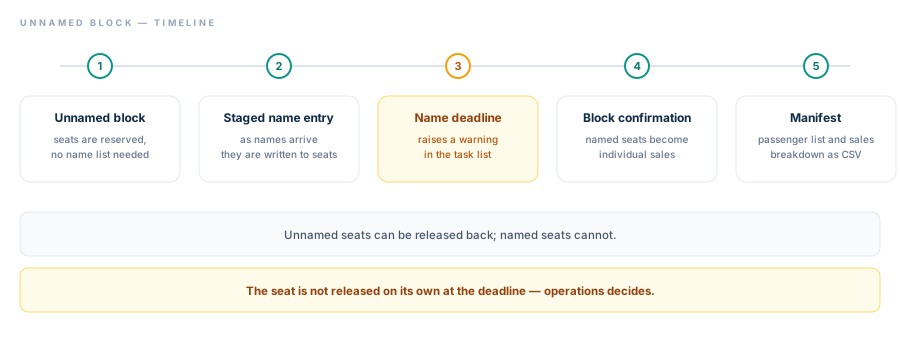
The deadline raises a warning in the task list; the decision to release the seats belongs to operations.
The name deadline is a critical threshold here. If the manifest handover to the airline slips, the block stays on your hands and you pay for the empty seats. The system brings that date in front of you as a warning in your task list — but it does not release the seats on its own. This is a deliberate choice: losing a block automatically because a name list was completed at the last moment is far more expensive than whatever that decision would have saved. The call belongs to operations.
Check these when you go live
- Leg setup: Have you defined the outbound and return legs separately, and if there is a connection, is the route chain in chronological order?
- Allotment and overbooking allowance: Does each leg's seat count match the contract exactly, and is the overbooking allowance a deliberate number rather than a forgotten default?
- Passenger-type fares: Have the base amount and taxes been entered separately for adult, child and infant?
- Cost items: Do not build price tiers before entering flight costs; without seeing the break-even point you cannot know at which tier to stop.
- Load-factor tiers: Tiers apply to the base fare; design them with the agency markup in mind so you do not raise the price twice.
- Allocation and mode: Does the total number of seats given to agencies stay within capacity, and does the quota mode match your commercial intent?
- Release-back date: Is the date on which an unsold allocation returns to the pool early enough for you to resell that seat?
- Season and series: Do not generate a 52-week chain before validating the template flight; test a single flight first, then multiply it.
- Provider display name: Is the name your agencies will see on the search screen your own brand?
- Manifest rehearsal: Export the manifest once before confirming a block and compare it with the fields the airline asks for.
Limits and notes
Let us also state plainly what this module does not do today; a wrong expectation is expensive in charter.
- There is no graphical seat map. The seat number is written to the passenger record as a label; there is no selection over a cabin plan, and that label does not affect the seat counters.
- One fare package is defined per flight. You cannot sell several branded packages such as Economy, Flex or Business side by side on the same flight.
- No real PNR or e-ticket is produced. A charter sale is recorded with a local reference; no record is written to an external airline or GDS system.
- Post-booking reprice is not supported. Because the local fare does not change, that flow is closed.
- There is no multi-city (open-jaw) charter search. Multi-city search works on the scheduled flight side; charter is sold as one-way and round-trip.
- The name deadline does not trigger an automatic cancellation. It only provides visibility in the task list.
- A seat marked as no-show does not return to the pool automatically, nor is it passed to the waitlist; operations makes that call.
- Cancelling a confirmed sale paid by wallet does not create an automatic refund; the refund is reconciled manually on the finance side.
- There is no charter-specific notification or reminder e-mail template.
Frequently asked questions
How do I open my charter flight for sale to my sub-agencies?
You first create the flight in the catalogue and define its legs, seat allotment and passenger-type fares. When you set the flight to active and open it for sale, your inventory is included in search distribution. Your sub-agencies see the flight on their standard flight search screen; you do not need a separate portal or connection.
Can I sell the same seat to different agencies at different prices?
Yes. After the load-factor tier updates the base fare, the multi-layer agency pricing rule chain comes into play. You can define a different price and commission structure for each agency, and the rise in load factor is reflected to all of them without breaking that structure.
What happens to seats I allocated but did not sell?
When the release-back date you set arrives, the unsold allocation automatically returns to the shared pool and becomes available to every agency. If you choose the "fall back to shared pool" quota mode, the agency whose allocation is used up also keeps selling from the pool.
Can a customer take a seat option without paying?
Charter sales are designed to be completed with payment; no unpaid option is opened. The reason is that a charter seat is a real stock item — an unpaid option locks sellable allotment for nothing. For a timed hold you use the waitlist option and the unnamed block booking.
How does this differ from the group booking product?
The block you hold here sits on top of charter stock you already own. Collecting quotes from an airline and negotiating a group fare is a separate process, and it runs on the group booking management system side.
Do I need to set up a separate supplier integration for charter?
No. In the charter module you do not connect to an external supplier — the seat you sell already belongs to your own flight. Your inventory is registered as an internal flight provider that requires no credentials, and it passes through the same search, cart and booking flow as external supplier results.
What you can do today
- Start with a single flight. Create one upcoming charter departure in the catalogue, enter its legs and allotment, and validate the fare while it is still in draft. Do not move to series generation before you are sure it behaves correctly.
- Enter the costs, then build the tiers. Define your load-factor tiers only after entering the flight cost items and seeing your break-even point. Your pricing policy will then rest on that flight's own numbers rather than on a hunch.
- Try the first allocation with one agency. Allocate seats to a single sub-agency and watch the quota mode and the release-back date across one season; see which mode fits your commercial structure before opening it to the whole network.
To see in detail how to manage your charter inventory end to end, take a look at the Charter Flight Ticket Software page, or share your flight programme with us and ask for a go-live plan built around it.